


Accounting has never been my favorite subject, but I’ve learned how critical it is to running a business well.
After struggling through finance during my MBA and later working with finance teams, I saw firsthand where accounting tools fall short: clunky interfaces, limited automation, and platforms that don’t scale as your business grows. That’s exactly why choosing the best accounting software isn’t just about features; it’s about finding the right fit for your business.
In this guide, I’ve analyzed G2 reviews and real user feedback across leading tools such as Sage Intacct, NetSuite, Xero, QuickBooks Online, Acumatica, Microsoft Dynamics 365 Business Central, QuickBooks Enterprise, FreshBooks, and FloQast to understand how they perform in real-world scenarios.
Instead of a generic roundup, this guide is built to answer what most buyers are already searching for, from the best accounting software for small businesses to whether QuickBooks still holds up against newer alternatives, while helping you choose based on your stage, complexity, and growth needs.
If you’re comparing options, moving away from spreadsheets, or trying to understand which features actually matter, this guide will help you choose the right accounting software with confidence.
9 best accounting software I recommend for 2026
| Accounting software | G2 Rating | Best for | Standout feature | Price |
|
Sage Intacct |
4.3/5 ⭐ | Best for automation and financial operations | Multi-dimensional reporting with automated consolidation across entities and currencies | Custom |
|
NetSuite |
4.1/5 ⭐ | Best for large or multi-entity businesses | End-to-end ERP integration unifying financials, inventory, and CRM in a single cloud platform | Custom |
|
Xero |
4.4/5 ⭐ | Best cloud-based solution | AI-powered bank reconciliation with automated transaction matching and unlimited user seats | $2.90/mo |
|
QuickBooks Online |
4.0/5 ⭐ | Best overall | Intelligent bank feed auto-match that learns categorization patterns and reduces reconciliation time by up to 90% | $1.90/mo |
|
Acumatica |
4.4/5 ⭐ |
Best for customization |
Highly flexible cloud ERP with custom dashboards, workflows, and generic inquiries built on the fly | Custom; Starts at under $1500 |
|
Microsoft Dynamics 365 Business Central |
4.0/5 ⭐ | Best mid-sized ERP-based accounting solution | Native Microsoft ecosystem integration with Excel, Outlook, Power BI, and Teams for seamless financial workflows | $70/mo |
|
QuickBooks Desktop Enterprise |
4.2/5 ⭐ | Best for inventory and payroll | Advanced multi-location inventory tracking with barcode scanning, serial/lot numbers, and integrated payroll | $2210/year |
|
FreshBooks |
4.5/5 ⭐ | Best for freelancers, small businesses | Built-in time tracker that automatically links tracked hours to client invoices for accurate billing | $10.50/mo |
|
FloQast |
4.6/5 ⭐ | Best for financial close management | Automated reconciliation engine that pulls GL balances directly from ERPs and matches transactions at scale | Custom |
*These accounting software solutions are top-rated in their category, according to the G2 Spring 2026 Grid Report. I’ve also added their starting monthly pricing to make comparisons easier for you. All pricing details mentioned in the table and throughout this article are based on publicly available data at the time of publication and may change.
What makes the best accounting software?
When I first started working with finance teams, I realized accounting software isn’t just about bookkeeping; it’s what keeps business operations running smoothly behind the scenes.
At its core, accounting software automates tasks like expense tracking, invoicing, payroll, and financial reporting. But not all tools deliver the same value. The best accounting software goes beyond basic automation, helping teams reduce manual work, gain real-time visibility through dashboards, and integrate seamlessly with systems like CRMs and ERPs.
That’s also why adoption is growing fast. The global accounting software market is expected to reach $42.17 billion by 2032, underscoring the essential role these tools play in modern businesses.
And the investment pays off. According to G2 Data, the average payback period is around 17 months, with small businesses (52%), mid-market companies (33%), and enterprises (15%) all using these platforms.
The tools below aren’t just popular; they’re built for different stages of growth, which is exactly what makes choosing the right one so important.
How did we find and evaluate the best accounting software?
I spent weeks collaborating with finance and accounting teams, exploring how accounting software performs in real-world scenarios: what it does well, where it struggles, and whether it’s worth the investment. I also used artificial intelligence to analyze hundreds of product reviews on G2, uncovering users' needs, motivations, and pain points. I reviewed G2’s Grid Reports to assess how these solutions compare in terms of features, usability, and value.
When I couldn’t try or demo a platform firsthand, I consulted professionals with direct experience with the tool and cross-referenced their insights with G2 feedback.
After thorough research, I’ve compiled this detailed list of the best accounting software. The screenshots featured in this article are a mix of visuals taken from G2 vendor pages and publicly available product materials.
What I think defines the best accounting software
I considered the following factors when evaluating the best accounting software solutions.
- Aligns with your workflows: For those wondering, what's the best accounting solution for a growing business, it usually comes down to how well the software scales as transaction volume, complexity, and headcount increase. Accounting software solutions that handle high transaction volumes without slowing down are invaluable, especially as your business grows. I’ve also found modular add-ons helpful for expanding functionality, such as integrating inventory management or project accounting down the line.
- Reporting and analytics: In my experience, the ability to generate financial reports like trial balances, variance analyses, and cash flow forecasts is critical for decision-making. I’ve worked with accounting software solutions that offer real-time dashboards with drill-down capabilities, which made it easier to analyze specific segments like regional performance or departmental budgets. Compliance-specific reports for tax filings (e.g., VAT, GST) and standards like IFRS or GAAP are also essential, especially during audits. The ability to export reports in multiple formats and connect to business intelligence tools like Tableau or Power BI has been invaluable for advanced analytics.
- Integration capabilities: One of the top questions I asked throughout testing was which accounting software integrates best with other tools. Seamless integration with CRMs, ERPs, and payment processors was critical for avoiding manual entry and keeping data consistent across platforms. Real-time synchronization helps us maintain accurate accounts receivable/payable records and reconcile bank transactions. I also appreciate pre-built connectors for third-party apps like Shopify or Zoho and data import/export features for simplifying workflows and migrating data from older systems or integrating historical financial data.
- User experience: Having worked with various accounting tools, I know firsthand how critical user experience is. A responsive design that works across desktops, tablets, and mobile devices makes a big difference, especially for accessing data on the go. Role-based access management helps us control who sees or edits specific data. Some of the best systems I’ve used also included AI-driven features like predictive data entry and automated journal entry suggestions, which saved us time. If you operate internationally, like I’ve had to, multi-language and multi-currency support are essential for complying with local standards.
- Security and compliance: The best accounting software I’ve used offered top-notch encryption, like AES-256, to protect data in transit and at rest. Features like multi-factor authentication (MFA) and single sign-on (SSO) added an extra layer of security that gave us peace of mind. Regular vulnerability assessments and updates are critical for staying ahead of cybersecurity threats. I’ve always looked for systems compliant with regulations like the General Data Protection Regulation (GDPR) or the Sarbanes-Oxley Act (SOX). Audit trails are also invaluable for tracking actions and preventing fraud.
- Total cost of ownership (TCO): In my experience, looking beyond the initial price tag is essential when evaluating accounting software. Cloud hosting, updates, and training costs can add up, especially if the software has a steep learning curve. I’ve also found 24/7 support invaluable and learned to account for potential downtime during implementation or migration and consulting fees for external help.
To be included in the Accounting Software category, a product must:
- Maintain an organization’s general ledger and manage its chart of accounts efficiently.
- Provide tools to automate accounts receivable processes and streamline invoicing.
- Simplify accounts payable workflows, including payment processing and managing purchase orders.
- Users can create and post journal entries for transaction adjustments and balance updates.
- Track expenses and income while analyzing the profitability of products and services.
- Manage cash flow, bank accounts, and multiple payment methods like checks, credit cards, and ACH transfers.
- Support the financial close process to ensure accurate reporting at the end of each accounting period.
- Generate standard financial reports, including statements and dashboards, to monitor key financial metrics.
After reviewing G2 Data and testing features hands-on, I’ve narrowed down the top-rated accounting service apps for medium-sized companies, balancing automation, reporting depth, and integrations that support more complex operations.
*This data was pulled from G2 in 2026. Some reviews may have been edited for clarity.
1. Sage Intacct: Best for automation and financial operations
Sage Intacct is often praised for its customizability, with users highlighting how the platform can be tailored to automate recurring tasks such as invoicing and financial consolidations. This flexibility is a significant draw for businesses that need a more personalized accounting solution. Many reviewers also appreciate the tool’s ability to integrate seamlessly with various systems like Salesforce and payroll tools, making it a versatile option for businesses with diverse needs.
One feature that I see getting a lot of love is automation, particularly around tasks like reconciliations. Many users mention how Sage Intacct reduces manual data entry and reconciliations, freeing up time for more strategic tasks. This automation is often called out for its effectiveness in streamlining operations and improving efficiency across the board.
According to feedback I gathered from G2 users, Sage Intacct's reporting capabilities are a standout feature. Users frequently highlight its ability to generate multi-dimensional reports and customizable dashboards. The platform’s reporting flexibility is praised by many, as it allows businesses to slice data in various ways to gain valuable insights. However, some users also note that the learning curve for creating advanced reports can be steep, particularly for those who are new to the system.
A consistent theme in G2 reviews that I’ve noticed is how well Sage Intacct handles multi-entity, multi-currency operations. Reviewers often mention that the platform makes consolidating data across different subsidiaries and currencies effortless, eliminating the need for manual processes in Excel. According to G2 Data, journal entries rated at 90% and multi-entity consolidation at 86% the highest general ledger and consolidation ratings among the tools on this list. This is a major advantage for businesses operating internationally.
Users frequently praise Sage Intacct's document attachment capability. The ability to attach invoices, receipts, and supporting documents directly to AP entries and transactions is described as a significant time-saver for audit preparation, keeping everything centralized and easily accessible during reviews.
G2 reviewers also consistently highlight the platform's cloud-native architecture. Because Sage Intacct is fully web-based, users can log in from anywhere, making it particularly convenient for distributed teams and remote finance professionals who need to manage books without being tied to a specific office or desktop.
A number of recent reviews highlight Sage Intacct's support for scaling organizations. Users transitioning from simpler tools like QuickBooks note that the platform grows with the business, offering modular add-ons for budgeting, project accounting, and advanced reporting that can be activated as complexity increases, without requiring a full migration to a new system.
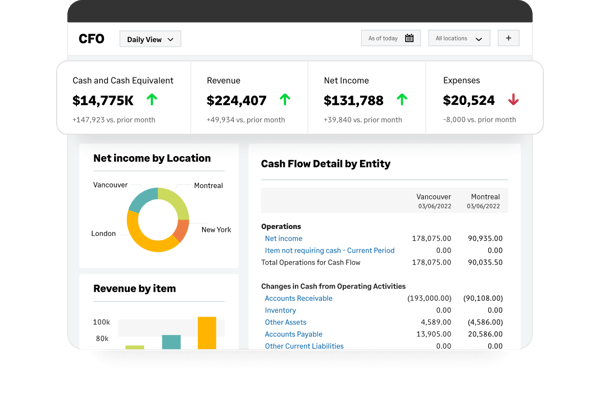

G2 reviewers appreciate how reliably Sage Intacct handles day-to-day performance. At the same time, a few users note that working with very large datasets or generating highly detailed reports can require additional processing time. For teams regularly running complex consolidations, planning report schedules around heavier workloads can help keep things running smoothly.
The platform's error notification system covers most workflows well. In certain cases, such as file uploads, some reviewers mention that messages could provide a bit more detail to help pinpoint the root cause faster. Sage's support resources and knowledge base can help bridge the gap when additional investigation is needed.
Nonetheless, because of its flexibility, automation, and strong analytics features, Sage Intacct is often considered one of the top-rated accounting service apps for medium-sized companies, particularly for teams that manage multi-currency operations.
What I like about Sage Intact:
- Users consistently highlight its automation of recurring tasks like invoicing, reconciliations, and consolidations, reducing manual work across multi-entity operations.
- Reviewers also value its real-time dashboards and cloud accessibility, enabling distributed teams to access live data and make faster decisions.
What G2 users like about Sage Intact:
“We are in Sage InTouch on a daily basis using the Accounts Payable, Cash Management, and Reporting features. I love the interactive reporting that gives me real-time results if I get my information in there. With the API tools, we are easily able to get transactions transferred from our policy processing platform to InTacct. We worked with a 3rd party consultant to get the API tools even more refined to get the transactions in there exactly how we wanted them. With their Help & Support feature, it makes finding answers on how to use the product a breeze.”
– Sage Intact review, Victoria F.
What I dislike about Sage Intacct:
- Based on G2 reviews, performance is generally reliable, but some users report slower processing with large datasets or complex reports, which can be managed with better scheduling.
- Reviewers also mention that error messages can lack detail at times, though support resources and documentation help resolve issues.
What G2 users dislike about Sage Intacct:
“There isn’t a proper report that clearly shows which bills, or which parts of bills, are included in the 1099 filing. It seems to rely only on vendor payments, so we had to do a lot of back-and-forth to figure it out. Also, when bills or invoices are entered at the top level, different views and reports don’t show which entity they were entered under when you run a report or when you’re viewing the bill/invoice page at the top level.”
– Sage Intacct review, Levi S.
Once your books are closed, planning begins. Explore the best FP&A tools to turn financial data into forward-looking insights.
2. NetSuite: Best for large or multi-entity businesses
NetSuite is highlighted as intuitive and easy to navigate across many G2 reviews. Many users mention how seamlessly they can run detailed financial reports or find the data they need without a hassle. However, a recurring point in reviews is the dated design of the interface. While functional, several reviewers desire a more modern look and feel to enhance the overall user experience.
I've noticed a consistent theme in G2 reviews regarding NetSuite's ability to handle multi-entity operations. Users often praise how the software simplifies financial consolidation across different divisions or subsidiaries, saving time and reducing complexity. This feature is particularly valued by businesses with operations spanning multiple entities or locations, making the process of synchronizing everything much easier.
Integration with third-party tools is another feature that stands out in user feedback. NetSuite is frequently recognized for its smooth compatibility with various systems, from CRM to inventory management software. G2 reviewers appreciate how these integrations eliminate the need for manual data entry, streamline processes, and improve overall efficiency across the business.
A standout capability frequently mentioned in G2 reviews is end-to-end financial automation. Users appreciate that NetSuite covers the full accounting cycle, from order-to-cash and procure-to-pay transactions through to general ledger posting, with all processes connected in a single system. Features like automated revenue recognition and bank transaction auto-matching save considerable time and reduce manual errors.
Recent G2 reviewers also highlight the strength of NetSuite's real-time reporting and dashboards. Users value the ability to access up-to-date financial data at any time, customize dashboards to track key metrics, and generate reports that support faster decision-making without waiting for batch updates.
Another theme emerging in reviews is the platform's cloud-based accessibility and scalability. Users appreciate that NetSuite's cloud architecture allows teams to access data from anywhere and supports business growth without requiring system migrations. Several reviewers note that NetSuite supported their company's expansion by scaling alongside increasing transaction volumes and complexity.
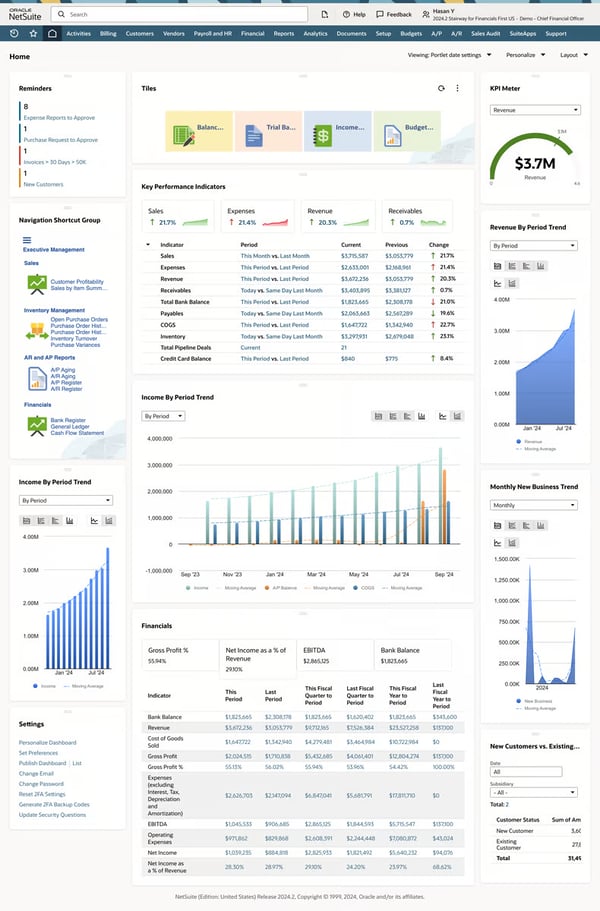

G2 users also frequently call out the depth of NetSuite's customization through built-in tools. The platform's custom fields, custom segments, saved searches, and SuiteFlow automation enable businesses to tailor workflows without needing external developers. Users describe this flexibility as especially valuable for adapting the system to specific industry requirements.
NetSuite's flexibility is one of its greatest strengths, and G2 reviewers appreciate the depth of customization available. At the same time, some users note that adapting certain features for specialized or niche use cases may take additional time and resources. Teams that engage implementation partners or leverage NetSuite's learning resources early on tend to get the most value from the customization process.
Users transitioning from simpler tools like QuickBooks note that the platform's depth of functionality takes time to fully familiarize with, particularly in complex modules such as revenue recognition. Most reviewers recommend allocating time for structured onboarding and education, and those who do find the investment well worth it for the capabilities they unlock.
Netting it out, NetSuite earns its spot as a top choice for large or multi-entity businesses because it delivers a truly unified cloud ERP that connects financials, operations, and reporting in one platform. If your priority is consolidated visibility across subsidiaries, automated end-to-end accounting, and a system that scales with your business, NetSuite is a strong fit.
What I like about NetSuite:
- Users consistently highlight its end-to-end financial automation, which connects order-to-cash, procure-to-pay, and general ledger processes in a single system to reduce manual work.
- Reviewers also value its deep customization, with tools like custom segments, saved searches, and SuiteFlow enabling tailored workflows without heavy reliance on developers.
What G2 users like about NetSuite:
“I find NetSuite most helpful when using the bulk tools to invoice orders. I also find it is a system that is user-friendly. The upside of using NetSuite is that it is much simpler than other systems I have used in the past.”
– NetSuite review, Sandra L R.
What I dislike about NetSuite:
- Based on G2 reviews, NetSuite’s UI can feel dated compared to newer tools, though its flexibility remains a major strength, and updates like Redwood aim to improve the experience.
- Reviewers also mention a learning curve, especially for complex modules like revenue recognition, but teams that invest in onboarding find the depth worthwhile.
What G2 users dislike about NetSuite:
“I don't like that NetSuite doesn't use natural language to find things or reports. It's challenging because the search tools require you to know exactly how to search for something. Also, the initial setup was a bit cumbersome, though it wasn't too bad with the help of a consultant or expert.”
– NetSuite review, Kelly W.
3. Xero: Best cloud-based solution
With its intuitive interface and accessible pricing, Xero is also one of the best accounting software for small businesses, particularly those that prioritize remote access and simplicity without sacrificing automation.
Based on G2 data, ease of use is rated at 92% and ease of setup at 90%, making Xero the most approachable accounting platform on this list for teams that want to get up and running fast. The standout feature rating is reconciliations at 92%, the highest reconciliation score among all tools covered here, which lines up with how consistently reviewers praise the automated bank matching experience.
One standout capability, according to users, is Xero’s bank integration. I’ve seen multiple reviewers praise how it syncs directly with bank accounts, pulling in transactions for quick reconciliation. The automation through bank rules is a frequent highlight, helping users save time and reduce manual errors.
A commonly appreciated element is the platform’s invoicing tools. G2 users mention that creating professional invoices, setting up recurring billing, and automating payment reminders make managing receivables far easier and less time-consuming.
Something G2 reviewers frequently highlight is Xero's clean and modern interface design. Users consistently describe the UI as uncluttered and easy to navigate, noting that non-finance team members can pick it up quickly without extensive training. Several reviewers compare it favorably to competing platforms, calling the layout more visually appealing and logically organized.
Recent reviews also point to Xero's unlimited user seats as a meaningful differentiator. Unlike many competitors that charge per-user fees, Xero allows businesses to invite team members, managers, and external accountants without additional licensing costs, which users describe as especially valuable for collaborative bookkeeping workflows.
Something G2 reviewers seem to really appreciate is Xero’s cloud accessibility. Many users point out the flexibility of accessing their financial data from any device, anywhere in the world, which makes it a good fit for remote teams or frequent travelers.
G2 reviewers also highlight Xero's growing AI-powered reconciliation suggestions. The platform's smart matching capabilities learn from past transaction patterns and automatically suggest categorizations, reducing manual effort over time and improving accuracy with continued use.
According to feedback I gathered from G2 users, Xero’s API and automation options receive positive attention, especially from users who want to integrate it with other tools for tasks like inventory, budgeting, or advanced workflow automation. Security is also widely praised, with features like two-factor authentication and encrypted connections giving users confidence when managing sensitive financial data.
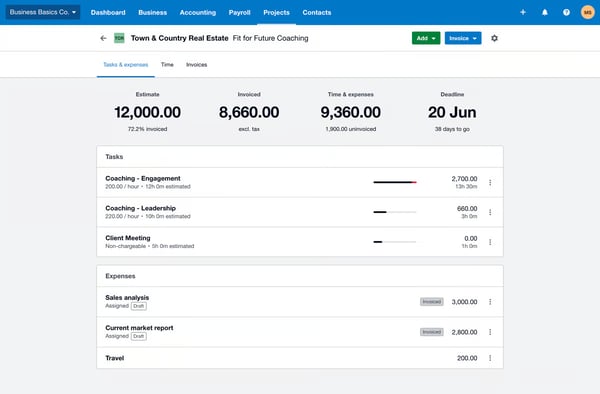

Xero's core accounting features earn consistent praise across G2. Payroll functionality works well in supported regions, and some users mention that coverage isn't yet available in every location, which may require third-party solutions in certain areas. For businesses operating in supported markets, the built-in payroll is a strong addition to the platform.
Xero's self-service resources and help center are extensive and well-documented. Some reviewers note that the email-based support model can occasionally lead to longer resolution times for complex or time-sensitive requests. Teams that leverage the community forums and knowledge base alongside direct support often find answers more quickly.
Still, users consistently value Xero's reliability, security, and core accounting features, viewing it as a strong solution for small and midsize businesses.
What I like about Xero:
- I see users consistently appreciate Xero's clean, modern interface and how quickly both finance and non-finance team members can start navigating confidently.
- I also notice reviewers value the unlimited user seats on all plans, which let businesses invite team members, managers, and external accountants without worrying about per-user costs.
What G2 users like about Xero:
“Xero makes it so easy to reconcile my bank accounts, invoice my customers, and it is really intuitive!”
– Xero review, Kelley N.
What I dislike about Xero:
- Based on G2 reviews, Xero’s support relies heavily on email, which can lead to slower resolution for complex or time-sensitive issues, though users often find quicker answers by combining support with community resources.
- Payroll works well where supported, but reviewers note limited regional availability, with many teams relying on integrations like Gusto to fill the gap.
What G2 users dislike about Xero:
“At certain times, small changes may take a little more effort, particularly when making adjustments to the existing data.”
– Xero review, Juli D.
4. QuickBooks Online: Best overall
QuickBooks Online often garners praise for its inventory tracking feature, which users find reliable for small to mid-sized operations. While it may not be the best fit for large-scale enterprises, the majority of reviewers mention that it effectively handles their inventory needs. Some users, however, point out the necessity of integrating third-party apps for more advanced inventory management, which QuickBooks Online accommodates well through seamless integration with other tools.
Based on G2 Data, QuickBooks Online has the most small-business-centric user base on this list, with 82% of reviewers coming from companies with 50 or fewer employees. The estimated ROI payback period is 12 months with average user adoption at 80%, reflecting a platform that delivers fast time-to-value for teams that want to get productive without extensive onboarding.
A standout feature that I frequently see getting positive remarks from G2 reviewers is its automation for transaction matching. Users love how it automatically categorizes expenses and syncs with bank accounts and credit cards. Many reviewers note how this feature saves them considerable time, making reconciliation quick and easy, and some even liken it to having an assistant that simplifies financial tasks.
This makes QuickBooks Online one of the best accounting management apps to sync with bank accounts, especially for small businesses that want to save time on transaction matching.
According to feedback gathered from G2 users, QuickBooks Online's reporting capabilities are widely appreciated, especially for creating profit-and-loss statements.
Another aspect frequently praised by users is the cloud-based setup. I’ve noticed that G2 reviewers often highlight how the ability to access QuickBooks Online from multiple devices, whether at home, the office, or on the go, adds significant flexibility. This cloud-based feature eliminates concerns over file loss or data synchronization, making it an attractive option for businesses prioritizing accessibility and convenience.
A theme that has grown stronger in G2 reviews is the platform's AI-powered bank feed and auto-match feature. Users describe how the system learns their categorization patterns and automatically matches transactions to the correct accounts, with several reviewers noting that what once took 20 hours of manual bank entry per month now takes under two hours. This intelligent automation continues to improve with use, making monthly reconciliation faster over time.
Recent reviewers also consistently highlight how QuickBooks Online serves as a true one-stop platform for small business needs. Beyond core accounting, users appreciate the integrated payroll, bill pay, invoicing, and tax-readiness tools all housed within a single system, eliminating the need to manage multiple subscriptions or juggle between different applications.
G2 feedback also points to the platform's strong multi-client management capabilities. Accountants and bookkeepers managing multiple businesses praise QuickBooks Online Accountant for letting them oversee several clients from one dashboard, streamlining workflows for professionals who handle books across many organizations.
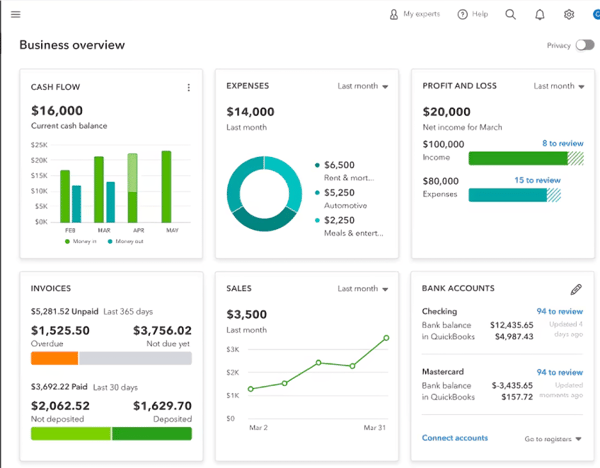

QuickBooks Online's reporting covers the essentials well, and many users rely on it daily. Some G2 reviewers mention they'd appreciate more filter options and customization fields for tailoring reports to very specific business needs. For teams needing highly detailed reporting, exploring the Advanced plan or integrating with tools like Power BI can help expand those capabilities.
The platform's support channels effectively cover a broad range of inquiries. A few reviewers note that responses to simpler questions could be more efficient, especially when timely resolutions are important. Users who take advantage of the in-app help resources and community forums alongside direct support often find a faster path to answers.
If you're specifically looking for the best accounting management app to sync with bank accounts, QuickBooks Online makes the process seamless by automatically pulling transactions for easy reconciliation.
What I like about QuickBooks Online:
- Users consistently highlight the AI-powered bank feeds and auto-match feature, which reduces manual data entry by learning categorization patterns over time.
- Reviewers also value its all-in-one approach, combining accounting, payroll, invoicing, bill pay, and tax tools in a single platform.
What G2 users like about QuickBooks Online:
“I like how you can quickly search for any customer information. You can create a statement with a balance forward or open item as well. I also like the estimate feature. And I like how it can also automatically chase clients when they haven't paid within their set time frame. It significantly reduces the time that I have to spend chasing clients for payments and searching for a specific invoice or customer engagement item, making everything quick and easy for both myself and the client.”
– QuickBooks Online review, Katie S.
What I dislike about QuickBooks Online:
- Based on G2 reviews, its reporting covers everyday needs well, though some users note limited advanced filtering and formatting, with deeper analytics available in higher plans or through integrations.
- Support is generally effective, but reviewers note that responses to simpler queries can be slower at times, with faster resolution often coming from using help resources alongside support.
What G2 users dislike about QuickBooks Online:
“What I dislike about QuickBooks Online is that it can sometimes be slow or laggy, especially when working with large data sets. Certain features feel limited compared to the desktop version, and customization options for reports are not always flexible. Additionally, the subscription cost can be high for small businesses, and customer support response times can occasionally be inconsistent.”
– QuickBooks Online review, Prabha B.
5. Acumatica: Best for customization
Acumatica offers a well-rounded toolkit for businesses looking to manage their finances, operations, and customer relationships from a single platform.
I've noticed a consistent theme in G2 reviews: high customization. Users often highlight how easy it is to tailor workflows, build custom dashboards, and generate financial reports specific to their needs. Whether handling invoicing, cost analysis, or account reconciliation, many reviewers appreciate that the software adapts to their business, not the other way around.
Based on G2 Data, Acumatica scores highest among the tools on this list for product direction at 93%, reflecting strong reviewer confidence that the platform is evolving in the right direction. On the feature side, purchase orders are rated at 86% and inventory tracking at 84% on G2, reinforcing why construction, manufacturing, and wholesale teams gravitate toward the platform for operations-heavy accounting.
Another standout capability, according to users, is real-time access to financial data. Because Acumatica is fully cloud-based, users say they can check critical metrics on the go, from their desktop or mobile device. This level of visibility seems especially valuable for teams that need up-to-date insights at all times.
A theme that comes up consistently in G2 reviews is Acumatica's user-friendly interface and low barrier to entry. Reviewers describe the UI as intuitive and easy to navigate, noting that once users learn how one module works, the experience is consistent across all modules. Several reviewers mention that even non-technical team members can get productive quickly, which speeds up adoption across departments.
Recent G2 reviewers also frequently highlight the power of Acumatica's Generic Inquiries (GIs) for data analysis. Users describe how they can spin up custom data views in minutes, drill down from high-level reports directly into source transactions, and clone existing reports to add new dimensions on the fly. This flexibility in data exploration is called out as a standout capability that helps finance and operations teams find answers faster without relying on external tools.
Another emerging highlight in reviews is the platform's strength in inventory and operational visibility. Users in construction, manufacturing, and wholesale praise the ability to track stock levels, run inventory analysis, and manage physical inventory counts directly within the system. Reviewers describe this real-time operational insight as essential for making faster purchasing, shipping, and fulfillment decisions.
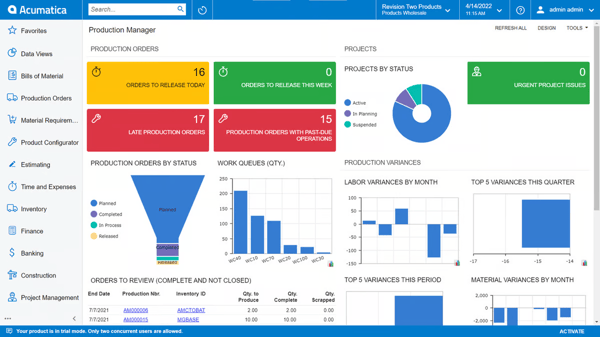

Acumatica's breadth of capabilities is widely appreciated by G2 reviewers. Some users note that the platform's depth takes time to fully understand during initial setup, and customizing it to align with specific business requirements may benefit from additional support, especially for organizations with more complex operations. Teams that partner with a certified VAR for implementation tend to get the most out of the platform from day one.
The platform reliably handles most day-to-day financial workflows. There's occasional feedback about minor system inconsistencies in areas such as email functionality or the handling of vendor and customer balances, though these are not commonly reported. Acumatica's support team is available to help resolve them when they arise.
Looking at the broader review trends, Acumatica excels in delivering customizable, cloud-based ERP solutions that grow with your business. The verdict from reviewers? It's especially good for companies that need flexibility, real-time data access, and integration across systems.
What I like about Acumatica:
- I see users consistently appreciate the intuitive, consistent interface that makes it easy for non-technical team members to navigate across modules.
- I also notice reviewers value the platform's strength in inventory and operational visibility, especially in construction, manufacturing, and wholesale.
What G2 users like about Acumatica:
“Acumatica is configured to meet specific needs, with options for additional modules as the company grows.”
– Acumatica review, Guillaume B.
What I dislike about Acumatica:
- Based on the G2 reviews I analyzed, Acumatica's breadth of capabilities is widely appreciated. Initial setup and customization can take time to fully understand, especially for organizations with complex operations, and teams that partner with a certified VAR tend to get the most from the platform from day one.
- I also notice that most daily workflows run smoothly and reliably. Occasional inconsistencies in areas like email functionality or vendor balance handling may need attention, and Acumatica's support team is available to help resolve them when they arise.
What G2 users dislike about Acumatica:
“It’s not as customizable as we would like it to be. We have to reach out to get things personalized for our own company.”
– Acumatica review, Robert R.
6. Microsoft Dynamics 365 Business Central: Best for mid-sized ERP-based accounting solution
Microsoft Dynamics 365 Business Central stands out to G2 users for its ability to centralize key accounting tasks. Based on user feedback, it consolidates the general ledger, accounts payable, receivables, and fixed assets into one platform, which helps streamline finance operations for mid-sized to large teams.
A commonly appreciated element is its integration with Excel and Outlook. According to feedback I gathered from G2 users, many value the ability to pull real-time data into Excel or send invoices directly through Outlook. This level of connectivity feels especially seamless for businesses already invested in Microsoft’s ecosystem.
One feature that I see getting a lot of praise is accounts payable automation. Across multiple reviews, users mention how the platform reduces manual checks and improves the accuracy and timing of vendor payments, helping teams reclaim hours otherwise spent on repetitive tasks. G2 Data shows this resonates especially with mid-market and enterprise organizations: 59% of the platform's reviewers come from mid-market companies and 18% from enterprises, the highest enterprise adoption share on this list.
The platform’s reporting capabilities are highly praised. Users frequently highlight how easy it is to generate profit and loss statements, cash flow reports, and tax summaries. The ability to customize these reports has helped some teams make more informed financial decisions.
Another frequently mentioned strength is the platform's Power BI integration and advanced analytics capabilities. Users appreciate being able to build clean, customizable dashboards that visualize financial data in real time, enabling leadership to make faster, data-informed decisions without relying on manual report generation. G2's feature score for budgeting and forecasting sits at 83%, the highest among the tools covered here, reinforcing the platform's value for strategic financial planning.
Another frequently mentioned strength is the platform's extensibility through AL extensions and the AppSource marketplace. Users appreciate the ability to install add-on apps and customize the system without impacting the base application, making it easy to tailor the platform to specific industry needs while preserving compatibility with future updates.
G2 reviewers also value the cloud-based deployment for enabling remote and distributed teams. Multiple reviewers mention that accessing financial data from anywhere without on-premise infrastructure makes collaboration across locations significantly easier. For organizations with hybrid or fully remote finance teams, this cloud-first setup removes the friction of location-dependent access and keeps everyone working from the same real-time data.
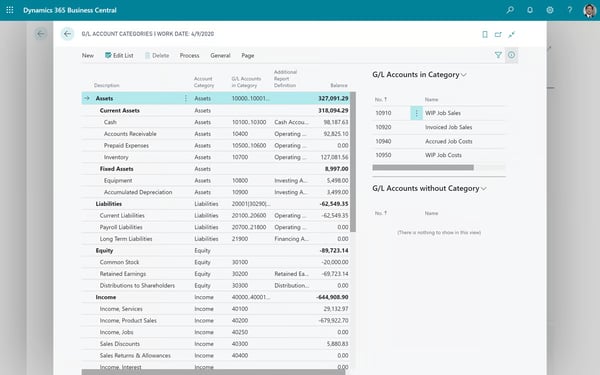

Some users mention that the breadth of available capabilities takes time to get fully familiar with, and structured training helps teams become confident more quickly. Microsoft's documentation and partner ecosystem provide solid resources for teams during the onboarding phase.
The platform's backend capabilities are widely praised for their power and depth. Some users express interest in more flexibility to personalize dashboard views and workflows to match their specific operational needs, and Microsoft continues to expand personalization options with each update cycle.
Overall, Microsoft Dynamics 365 Business Central is a strong pick for mid-sized organizations that want an ERP-based accounting solution deeply connected to the Microsoft ecosystem. If your team already lives in Excel, Outlook, and Teams, and you need centralized financial management that bridges departments without adding new tools, this platform delivers.
What I like about Microsoft Dynamics 365 Business Central:
- Users consistently highlight its seamless integration with the Microsoft ecosystem, including real-time Excel data, Outlook invoicing, and Power BI connectivity.
- Reviewers also value how it unifies finance, sales, and operations into one centralized system, reducing data silos across teams.
What G2 users like about Microsoft Dynamics 365 Business Central:
“The ease of uploading journal entries and having the dimensional setup according to the office department location committee.”
– Microsoft Dynamics 365 Business Central review, Karuneshree T.
What I dislike about Microsoft Dynamics 365 Business Central:
- While its broad feature set supports complex financial operations, a few G2 users say it has a learning curve, though teams that invest in training and partner support ramp up faster.
- The backend is powerful, but G2 users' feedback tells that dashboard customization can feel limited for some users, even as Microsoft continues to expand flexibility over time.
What G2 users dislike about Microsoft Dynamics 365 Business Central:
“Microsoft Dynamics 365 Business Central setup, installation, and data migration can be time-consuming, and it's very difficult. expensive licensing price.”
– Microsoft Dynamics 365 Business Central review, Amit A.
7. QuickBooks Desktop Enterprise: Best for inventory and payroll
QuickBooks Desktop Enterprise frequently gets praise for its comprehensive coverage of business needs, from accounting to inventory management. Based on my evaluation of G2 reviews, QuickBooks Desktop Enterprise delivers a surprisingly user-friendly accounting software with payroll capabilities that simplify employee management and payroll taxes within one system.
The inventory management capabilities are often called out as a standout feature. I've noticed that users appreciate the ability to track items across multiple locations, manage serial and lot numbers, and use barcode scanning for efficient stock management. This control helps businesses maintain accurate inventory records and optimize operations.
Integrated payroll also stands out in user feedback. Reviewers often mention how seamless the payroll system is with QuickBooks Desktop Enterprise, simplifying the process of paying employees, managing taxes, and handling benefits. G2 feature scores reinforce this: payroll is rated at 87%, and time and expense tracking at 87%.
This integration reduces errors and saves time by keeping everything within the same ecosystem, and QuickBooks Desktop Enterprise is widely recognized as user-friendly accounting software with payroll capabilities, ideal for organizations that want everything in one place without third-party add-ons.
A theme that has gained traction in G2 reviews is the platform's strong multi-user support and concurrent access capabilities. Users appreciate being able to have up to 40 users working simultaneously in the same company file, which is essential for growing teams that need real-time access to financial data without performance bottlenecks.
Recent reviews also highlight the platform's accounting-level reporting clarity. Users describe the reporting as showing exactly how transactions are booked and how they flow between general ledger accounts, providing a transparent view of financial activity that accountants and auditors find particularly valuable. G2's feature score for financial statements sits at 90%, the highest reporting score among all tools on this list.
A consistent theme in G2 reviews that I’ve noticed is the industry-specific editions. Users in manufacturing, construction, and retail sectors value the customization options and specialized reports that cater directly to their industry’s needs, which adds relevance and usefulness to the software.
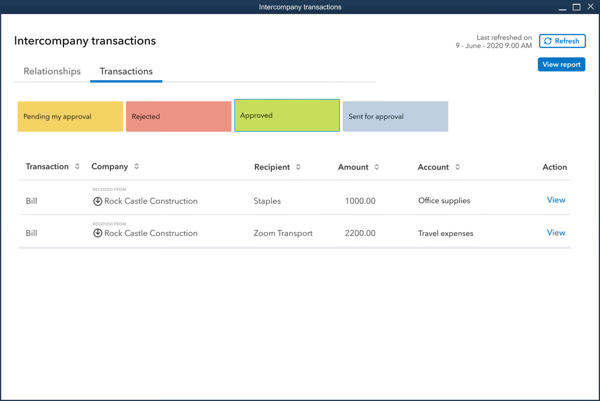

Some reviewers note that additional costs for certain add-ons can be a consideration as businesses scale, so factoring those into long-term budgeting helps keep growth plans on track. Many users find the added capabilities well worth the incremental investment.
QuickBooks Desktop Enterprise handles large volumes of data effectively for most businesses. The platform's 1.5GB file size limit is something organizations managing very large datasets may want to plan around, and teams that archive older data periodically find that this keeps performance running smoothly.
Nonetheless, these observations reflect opportunities for refinement rather than significant challenges, and many users still find the platform's core functionality, scalability, and integration capabilities to be strong overall. Considering all this, QuickBooks Desktop Enterprise is seen as a strong choice for businesses looking for comprehensive accounting and inventory management.
What I like about QuickBooks Desktop Enterprise:
- Its advanced inventory management stands out, with multi-location tracking, barcode scanning, and serial/lot number support, along with built-in payroll that keeps employee management tied to accounting.
- G2 reviewers also highlight the familiar QuickBooks interface, which helps teams get productive quickly while offering clear, accounting-level reporting and transaction visibility.
What G2 users like about QuickBooks Desktop Enterprise:
“The accounting-level reporting is clear and easy to understand. It reflects the raw accounting and shows how transactions are booked and how they move from one GL to another.”
– QuickBooks Desktop Enterprise review, Jackie M.
What I dislike about QuickBooks Desktop Enterprise:
- While it handles large data volumes well, the 1.5GB file size limit can require planning, though teams that archive older data typically maintain smooth performance.
- Third-party add-ons extend functionality, but additional upgrade and add-on costs should be considered, even if many users find the value worthwhile as they scale.
What G2 users like about QuickBooks Desktop Enterprise:
“It's expensive. Especially if you need to add users, payroll plans, or cloud hosting. Keeping it local is highly recommended as the cloud features are limited and the interface is older.”
– QuickBooks Desktop Enterprise review, Evan W.
8. FreshBooks: Best for freelancers and small businesses
FreshBooks is an all-in-one accounting platform that’s particularly popular with freelancers and small business owners. When evaluating what's the best accounting software for startups, FreshBooks stood out for its simplicity, easy invoicing, and time tracking that doesn't overwhelm founders who may not have finance teams in place yet. The estimated ROI payback period is just 7 months based on G2 Data, the fastest of any tool covered here, reflecting how quickly freelancers and small business owners start seeing value.
One commonly appreciated element is its invoicing functionality. I’ve frequently seen G2 reviewers highlight how easy it is to create professional-looking invoices, complete with logos, branding, and custom payment terms. Features like recurring invoices, automated reminders, and late fee calculations also seem to remove the hassle of chasing down payments.
Another standout capability, according to users, is the time-tracking tool. Many users like that they can start a timer as they work, and those hours are automatically pulled into invoices, reducing the chance of underbilling or relying on guesswork.
A standout theme in G2 reviews is the quality and accessibility of FreshBooks' customer support. Users consistently describe the support team as responsive, knowledgeable, and genuinely helpful, with several reviewers noting that they can easily reach a real person when issues arise. G2 satisfaction scores back this up: quality of support is rated at 94% and ease of setup at 94%, the highest support and setup scores among all tools on this list.
Recent reviews also highlight how well FreshBooks serves as a comprehensive small business admin tool beyond just accounting. Users appreciate that invoicing, bookkeeping, expense management, project tracking, and tax preparation all live within a single platform, enabling solo operators and small teams to manage their entire financial workflow without switching between multiple applications.
Another frequently mentioned strength is FreshBooks' project-level tracking capabilities. Users value the ability to assign expenses, time entries, and invoices to specific clients or projects, giving them a clear picture of profitability per engagement and helping inform pricing decisions for future work.
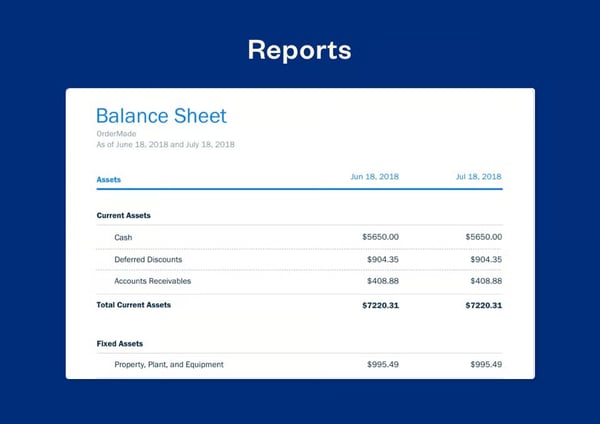

FreshBooks' payment integrations work well with platforms like Stripe, PayPal, and ACH transfers. A few reviewers note that processing may occasionally take additional time compared to instant transfers, though most transactions clear within a standard business cycle, and clients appreciate the convenience of paying directly from an invoice.
The platform covers essential accounting tasks effectively and delivers strong value at its core tier. Some users on G2 mention that costs can increase as teams grow, with additional user fees becoming a factor during scaling. For freelancers and small teams staying within the platform's sweet spot, the pricing remains competitive, and many find the time savings justify the investment as their business expands.
From what I've seen in G2 reviews, FreshBooks often ranks as the best-reviewed accounting app for freelancers, offering simple time tracking, invoicing, and expense management without overwhelming solo business owners.
What I like about FreshBooks:
- What reviewers praise most is how FreshBooks combines invoicing, time tracking, expense management, and project-level profitability tracking into one intuitive platform.
- The responsive, human-first customer support is another consistent highlight, with many reviewers calling out how quickly they can reach a real person when issues arise.
What G2 users like about FreshBooks:
“FreshBooks is easy to use and makes invoicing, expense tracking, and time tracking simple. I like that it helps me stay organized and get paid faster.”
– FreshBooks review, Ignacio C.
What I dislike about FreshBooks:
- FreshBooks' payment integrations work well, and users generally appreciate them. Processing may occasionally take additional time, and most transactions clear within a standard business cycle, so teams that plan around typical payment windows experience a smooth flow.
- Something a few reviewers flag is that FreshBooks delivers strong value at its core tier for freelancers and small teams. Adding more users increases costs as businesses grow, and many users find the time savings and workflow simplification more than justify the investment as their business expands.
What G2 users dislike about FreshBooks:
“Using their payment link is expensive, at over 3% of the transaction plus the fee. If you’re a current customer, I believe a 2% fee would be more reasonable.”
– FreshBooks review, Christian E.
9. FloQast: Best for financial close management
FloQast takes a different approach from traditional accounting software by focusing on what happens after transactions are recorded: the financial close process. Built by accountants for accountants, FloQast is an accounting transformation platform designed to automate close management, account reconciliations, and compliance workflows. Trusted by more than 3,000 global accounting teams, it's especially valued for bringing structure and transparency to the month-end close.
A commonly appreciated element across G2 reviews is the platform's close management workflow. Users consistently describe how FloQast centralizes all close tasks, checklists, and reconciliations in one place, replacing scattered spreadsheets and email chains with a structured, real-time dashboard. This visibility allows managers to track progress at a glance, identify bottlenecks, and ensure deadlines are met without constant manual follow-ups. According to G2 Data, FloQast has the highest Net Promoter Score (NPS) of any tool on this list at 78, and its ease of doing business score is 97%, reflecting how strongly accounting teams value the working relationship.
One feature that I see getting a lot of love is the reconciliation automation. G2 reviewers highlight how FloQast pulls general ledger balances directly from ERP systems and automates the tie-out process, significantly reducing manual data entry. The AutoRec Matching feature handles transaction-level matching for high-volume accounts like bank reconciliations, which users describe as a major time-saver.
Another standout capability, according to users, is FloQast's seamless ERP integration. The platform connects smoothly with systems like NetSuite, SAP, and Microsoft Dynamics, pulling data automatically and reducing the need for manual imports. Reviewers frequently mention that this integration is one of the easiest they've experienced, with minimal IT overhead required during implementation.
I've noticed a consistent theme in G2 reviews around the platform's ease of use and intuitive design. Users describe the interface as working the way accountants think, with logical navigation, clean layouts, and features that don't add unnecessary complexity. Many reviewers note that teams become productive quickly after implementation, with minimal ramp-up time needed. G2's user adoption score of 90%, the highest on this list, confirms how naturally the platform fits into daily accounting workflows.
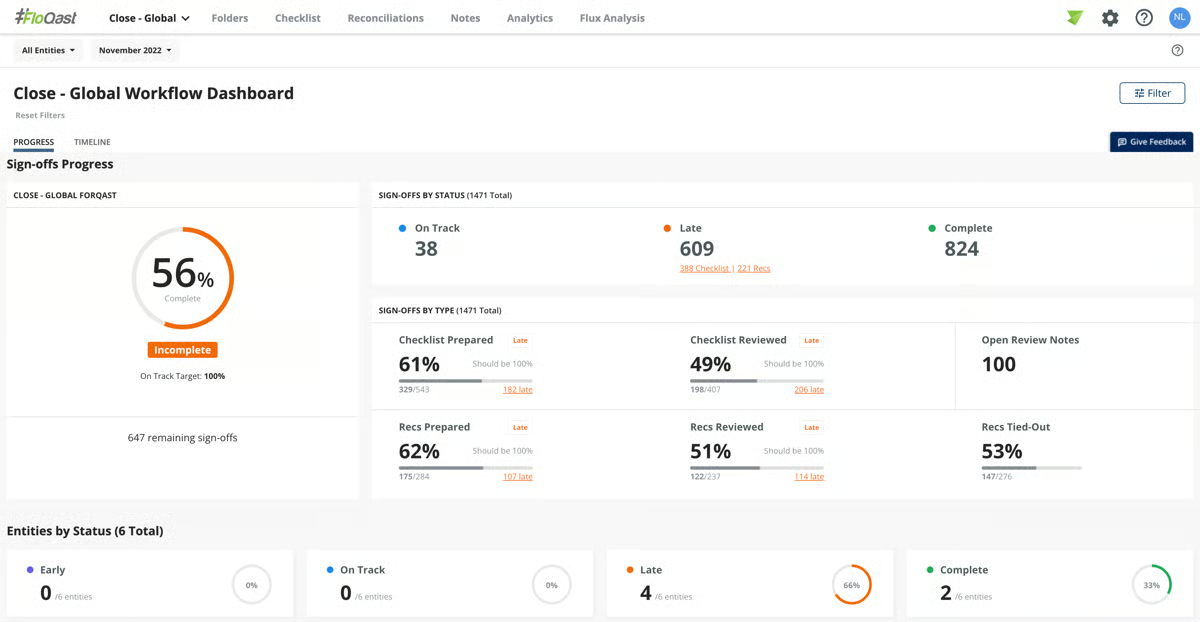

G2 reviewers also frequently praise the audit trail and compliance features. Every action, review, and sign-off is documented within the platform, making it easy to demonstrate compliance during audits. Users describe this as especially valuable for organizations subject to SOX requirements or those preparing for external audits.
FloQast's core close management and reconciliation features earn consistently high marks from G2 reviewers. Some users note that the platform's reporting and customization options, particularly around flux (variance) analysis, could offer more depth and flexibility over time. FloQast continues to invest in expanding its analytics capabilities, and teams that pair the platform with their existing BI tools can extend reporting reach in the meantime.
Some reviewers also note that the subscription cost may feel significant for smaller teams or organizations with simpler close processes. For teams with more than ten people or multi-entity reconciliation needs, the platform's time savings and audit-readiness benefits tend to deliver a clear return on investment.
Netting it out, FloQast earns its place as the top choice for financial close management because it brings structure, automation, and accountability to a process that many teams still manage through spreadsheets and email. If your priority is a faster, more accurate close with audit-ready documentation built in, FloQast is a strong fit.
What I like about FloQast:
- FloQast centralizes the entire close process into a structured dashboard, replacing scattered spreadsheets and email chains.
- Its automated reconciliation engine pulls GL balances directly from ERP systems like NetSuite, SAP, and Dynamics, while maintaining a strong audit trail that keeps teams audit-ready.
What G2 users like about FloQast:
“I like how FloQast makes the month-end close process very easy, fast, simple, and organized. The reconciliation automation is great because it reduces a lot of manual work. I also appreciate the Excel integration since our team heavily relies on Excel, and FloQast connects directly to it. The onboarding team was helpful and guided us through the straightforward initial setup.”
– FloQast review, Prithvi D.
What I dislike about FloQast:
- G2 reviewers mention that reporting and customization, especially around flux (variance) analysis, can be somewhat limited, even though the core close and reconciliation workflows are consistently rated highly.
- Pricing is another common concern for smaller teams, though users managing complex, multi-entity closes often say the efficiency gains and audit readiness justify the cost.
What G2 users dislike about FloQast:
“Its super expensive for the utility. Shouldn't be that expensive.”
– FloQast review, Badar K.
Accounting software: Frequently asked questions (FAQs)
Have more questions? Get your answers below!
Q1. What are some common recommendations for the best accounting service provider?
After reviewing G2 ratings and evaluating dozens of tools, my recommendations for the best accounting service providers include Sage Intacct, NetSuite, QuickBooks Online, and Xero. These platforms consistently deliver strong automation, reporting, and scalability for businesses across industries. For financial close management specifically, FloQast is a standout choice.
Q2. What is the best accounting software for small businesses?
QuickBooks Online, Xero, and FreshBooks are among the best accounting software for small businesses. They offer intuitive interfaces, strong automation features, and affordable pricing that make financial management accessible even without dedicated finance teams.
Q3. What’s the best accounting solution for a growing business?
Based on G2 review data, Sage Intacct, NetSuite, Acumatica, and Microsoft Dynamics 365 Business Central stand out as the best accounting solutions for a growing business. They offer advanced reporting, multi-entity support, and deep integrations that scale as complexity increases. For businesses outgrowing simpler tools, these platforms provide modular capabilities that expand alongside your operations.
Q4. Which accounting software integrates best with other tools?
Based on G2 user reviews, NetSuite and Microsoft Dynamics 365 Business Central integrate best with other tools like CRMs, ERPs, and payment processors. Acumatica also receives strong marks for its open API and third-party integrations. Xero's extensive app marketplace and QuickBooks Desktop Enterprise's compatibility with industry-specific add-ons round out the options for businesses that need seamless connectivity across systems.
Q5. What are the top-rated accounting service apps for medium-sized companies?
Sage Intacct, NetSuite, Xero, QuickBooks Online, Acumatica, Microsoft Dynamics 365 Business Central, and FreshBooks are among the top-rated accounting service apps for medium-sized companies. These tools offer flexible reporting, multi-entity support, and strong integration capabilities. For teams that also need financial close management, FloQast is a strong complement.
Q6. Which accounting software is best for startups?
QuickBooks Online, Xero, and FreshBooks are some of the best accounting software for startups. They combine user-friendly design with automation, scalability, and strong customer support to help startups build reliable financial processes early on.
Q7. What is the best-reviewed accounting app for freelancers?
FreshBooks is consistently one of the best-reviewed accounting apps for freelancers. It simplifies invoicing, time tracking, and expense management while staying easy to use even for non-accountants.
Q8. What are the top accounting software with cloud storage for enterprises?
NetSuite, Sage Intacct, Acumatica, Microsoft Dynamics 365 Business Central, QuickBooks Online, FreshBooks, Xero, and FloQast are among the best accounting tools with cloud storage for enterprises. These platforms offer robust financial management, automation, and integration features, making them ideal for scaling businesses that need secure, accessible financial data from anywhere.
Q9. What is the most user-friendly accounting software for payroll and invoicing?
Some of the most user-friendly accounting software for payroll and invoicing include QuickBooks Online, QuickBooks Desktop Enterprise, Xero, and FreshBooks. These platforms streamline payroll processing and invoicing workflows with intuitive interfaces.
Q10. What is the best accounting management app to sync with bank accounts?
QuickBooks Online, Xero, and FreshBooks are top accounting apps that sync with bank accounts for real-time transaction tracking and automated reconciliation. Their bank feed features automatically pull transactions, apply categorization rules, and simplify monthly reconciliation.
Q11. Which accounting software provides the best automation for financial tasks?
Sage Intacct, Xero, FreshBooks, NetSuite, and QuickBooks Online all offer strong automation capabilities, from recurring invoices and bank rules to automated reconciliations and AI-powered transaction matching. For financial close automation specifically, FloQast stands out with its automated reconciliation engine and close workflow management.
Q12. What is the best accounting software for managing cash flow?
The best accounting software for managing cash flow includes QuickBooks Online, Xero, FreshBooks, and Sage Intacct, offering real-time tracking, automated reports, and bank reconciliation to keep finances in check. For larger organizations, NetSuite and Microsoft Dynamics 365 Business Central provide deeper cash flow forecasting and multi-entity visibility.
Q13. What are the best accounting software options with AI-powered insights?
QuickBooks Online, Xero, and NetSuite leverage AI for automated expense categorization, predictive analytics, and financial forecasting. Sage Intacct and Acumatica also offer AI-driven automation for smarter bookkeeping and operational efficiency. For financial close intelligence, FloQast uses AI to automate reconciliation matching and variance analysis for accounting teams.
Q14. What accounting software offers the best value for money?
QuickBooks Online and FreshBooks offer affordable, feature-rich subscriptions for small businesses, with FreshBooks delivering the fastest ROI payback at just 7 months. Xero provides scalable pricing with strong automation tools and unlimited user seats for growing businesses. For mid-market and enterprise needs, Sage Intacct, Acumatica, and Microsoft Dynamics 365 Business Central offer strong return on investment through automation and multi-entity capabilities.
Q15. What is the best accounting software for financial close management?
FloQast is the top-rated tool for financial close management, offering centralized close checklists, automated reconciliations, and compliance tracking. It's especially valued by accounting teams that need to streamline month-end close processes and maintain audit readiness.
Your shortcut to choosing the best accounting software
After trying and evaluating a ton of accounting software, I’ve broken everything down to help you pick the one that works best for your business. Every tool has strengths and quirks; what fits perfectly for one company might not work well for another. That’s why I’ve laid it all out: features, pros, cons, and everything in between, so you can make a smart, confident choice.
Whether you need something simple to track invoices or a robust system to manage payroll and reports, there’s a solution for you. The right accounting software won’t just save you time; it’ll make your life much easier and let you focus on what matters: growing your business.
Check out the top 10 free accounting software for financial reporting.