


Not long ago, a call center meant rows of agents, banks of desk phones, and a single location handling every customer interaction. That model still exists, but it’s quickly becoming the exception rather than the rule.
That’s where call center technology comes in. From VoIP and call routing to analytics, CRM integration, and conversational AI, the right stack helps you manage higher volumes, route customers intelligently, and give agents the context they need to resolve issues faster.
In this guide, we’ll break down the key types of contact center technology, what each one does, the benefits they deliver, and how to choose the tools that match your team’s channels, call flows, and growth goals.
What Is Call Center Technology?
Call center technology is a collection of integrated digital platforms that help businesses manage, track, and optimize each customer interaction across voice, email, chat, SMS, social media, and more.
These technologies go beyond traditional phone call-based communication. They cover the full customer journey: routing calls to the right agent (ACD/IVR), surfacing customer information and context (CRM), automating repetitive tasks, analyzing interactions, and unifying every channel into a single workflow.

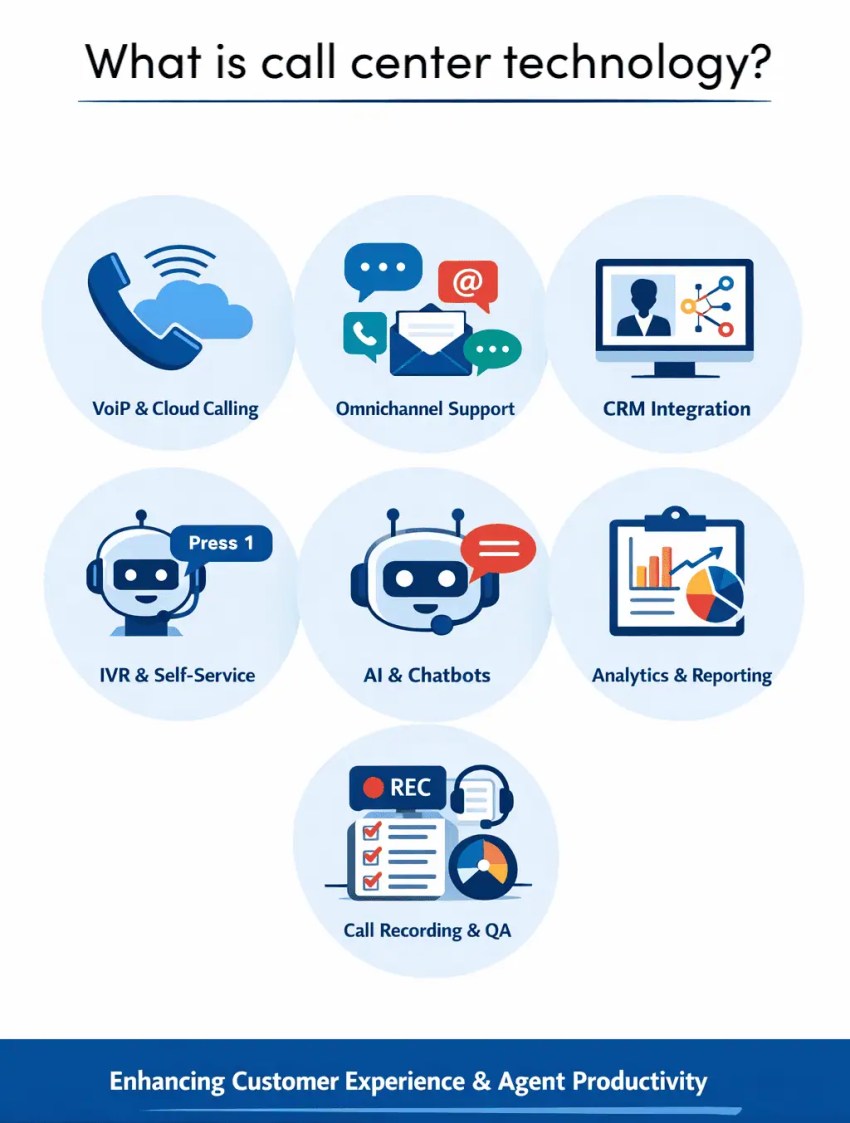
This technology allows call centers to improve customer experience by reducing wait times and enabling personalization. It also helps boost agent productivity through automation (dialers, workflows, AI assistance) and easier access to information.
For customer service leaders, the right technology stack isn’t optional, it’s what separates reactive support from a genuinely great customer experience.
Here’s a breakdown of the key types of contact center technology most teams rely on.
Types of Contact Center Technology
These are the core technologies that are essential for a productive call center and form the foundation for excellent customer service.
1. VoIP (cloud calling)
VoIP (Voice over Internet Protocol) enables business calling over the internet instead of traditional phone lines. It supports core voice features plus modern communications tools such as voicemail, SMS, and fax, often within one system. Voicemail-to-email integration helps ensure that customer inquiries do not slip through the cracks. It can also improve accessibility for agents with hearing impairments.
Because calls route through a cloud platform, teams can answer from desk phones, softphones, or mobile devices, which is, of course, useful for remote work and continuity. VoIP also scales easily as you add users, numbers, and call flows, typically with lower overhead than legacy telephony.

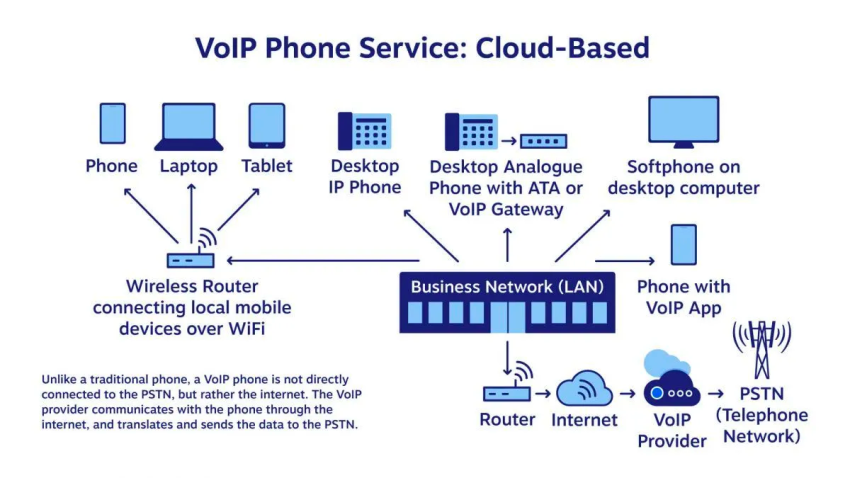
Most VoIP platforms include advanced cloud-based VoIP features that improve customer experience and operations, such as auto attendants, intelligent call routing, call recording, analytics, and CRM integrations that surface customer context during calls to provide personalized service.
2. CRM integration
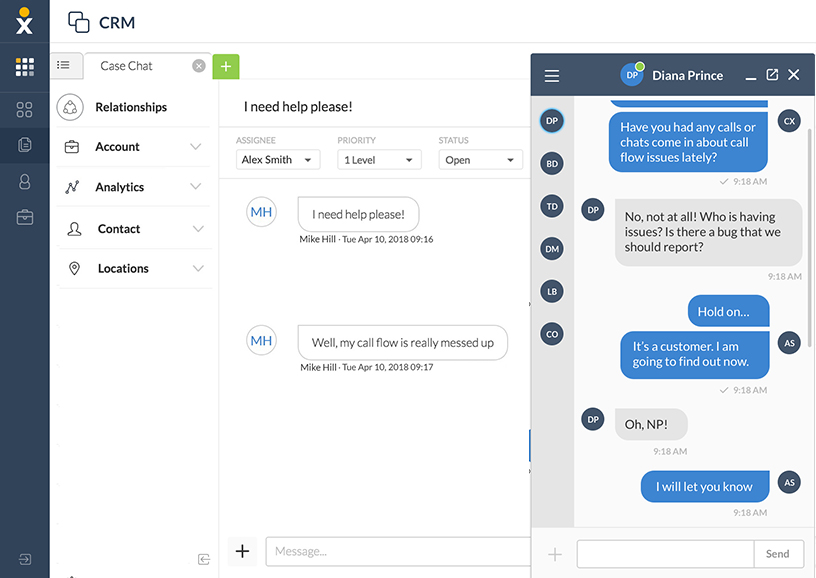
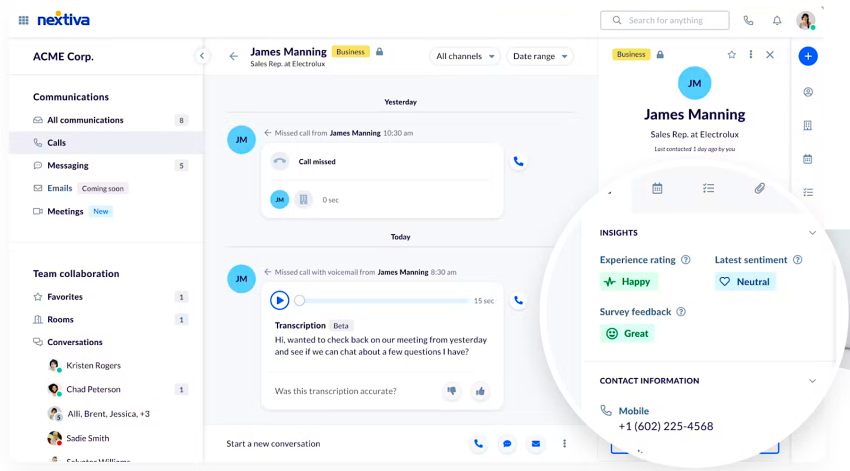
CRM (customer relationship management) integration connects your contact center tools with customer records so agents have context during every interaction—past purchases, support tickets, product preferences, notes, and account details—without switching screens. That context supports faster resolutions and more personalized conversations.
Common CRM-telephony features include:
- Screen pops and click-to-call so agents can answer or place calls from the CRM
- Automatic call logging (calls, outcomes, notes, recordings) tied to the right contact
- Smarter routing and prioritization based on customer status or history
- Better reporting that links conversations to outcomes like conversions, renewals, or churn signals
The result of CRM integrationsis optimized workflows, less manual work for agents, clearer visibility for managers, and a smoother experience for callers to ensure that you meet all customer expectations.

3. Computer Telephony Integration (CTI)
Computer Telephony Integration (CTI) is a powerful technology that links your phone system with business applications so each call center agent can handle calls directly from their computer to manage calls more efficiently and provide exceptional customer service. It’s what enables basics like screen pop (caller info appears automatically), click-to-call, and automatic call logging into a CRM or help desk.

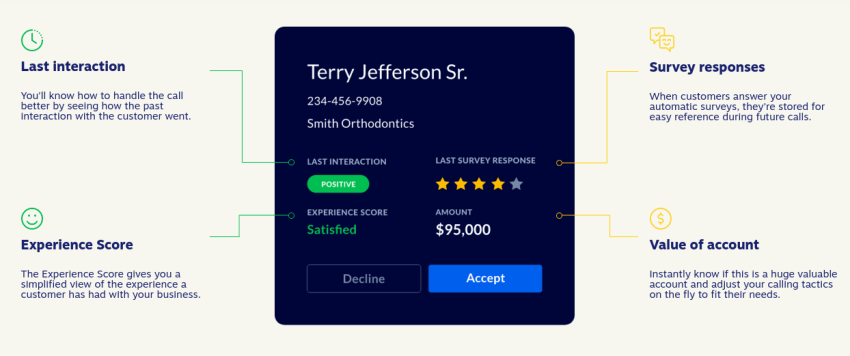
CTI also reduces manual work by automating steps such as saving call outcomes, attaching notes/recordings to the right contact, and triggering workflows after a call. The result is faster handling, fewer repeat questions, and better visibility into what happened across every customer interaction.
4. ACD (skills-based routing)
An automatic call distributor (ACD) manages inbound call queues and assigns calls to available agents. With skills-based routing, the ACD matches each caller to the best agent based on issue type, language, product knowledge, or customer priority.

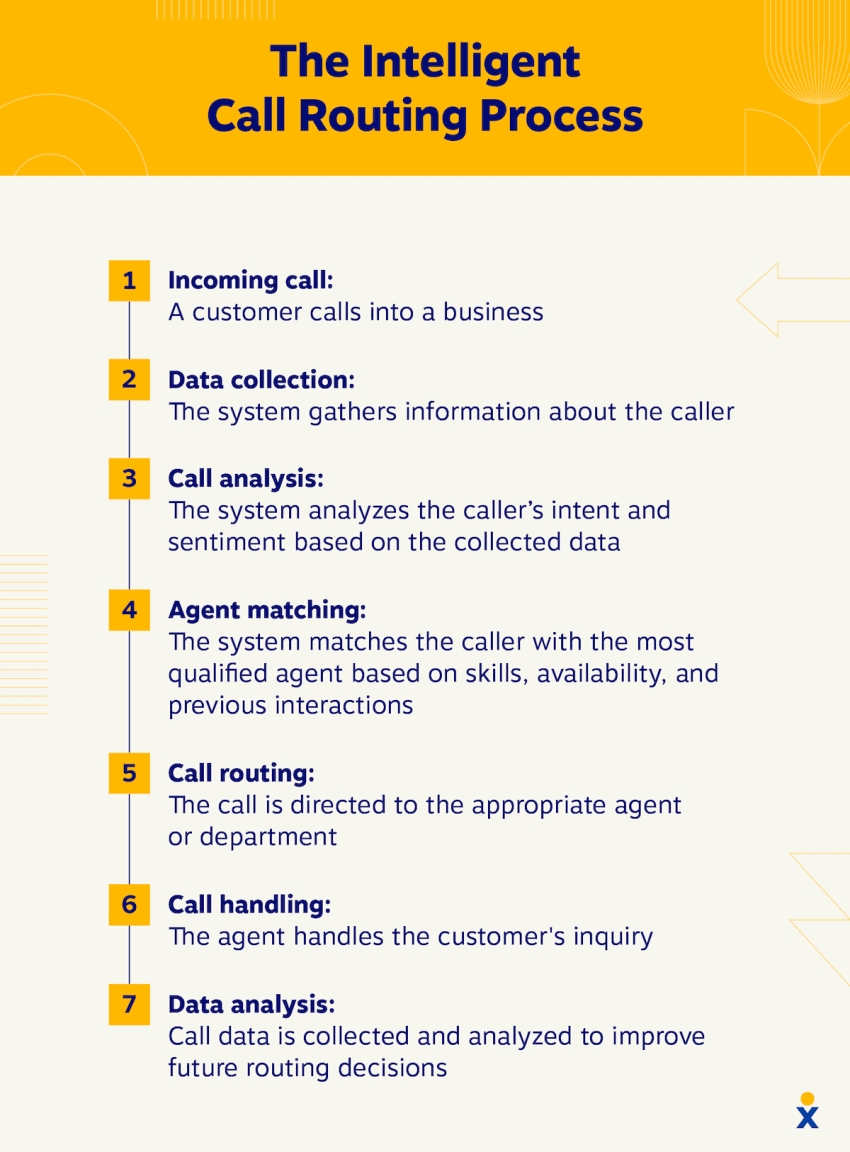
For example, let’s say Mohammed is trained in billing and payment processing, while Tina specializes in broadband troubleshooting. If a customer calls with a connectivity issue, skills-based routing sends the call to Tina—not Mohammed—so the customer reaches the right expert the first time.
This reduces misrouted calls and transfers, improves first-call resolution, and shortens handle time—because callers reach someone who can solve the problem without repeating themselves.
5. Self-service (IVR and auto-attendant)
Interactive voice response (IVR) and auto-attendants greet callers and route them to the right place using menu options or simple voice prompts. Done well, an effective IVR system can:
- Reduce call abandonment by getting callers to the right agent quickly.
- Lower costs by automating simple queries and providing self-service.
- Improve customer satisfaction through shorter wait times.
- Allow agents to focus on complex issues.

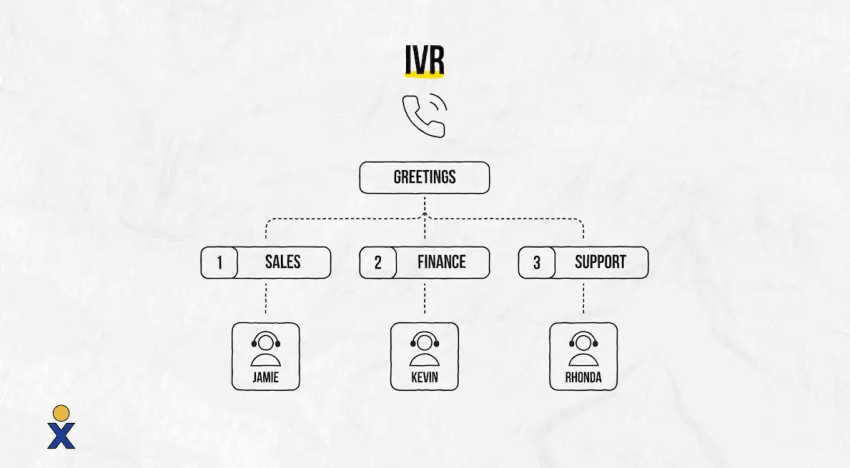
For example: “Thanks for calling ABC Company. If you know your party’s extension, dial it now. For billing, say or press 1. For tech support, say or press 2.” From there, the system routes the caller to the right department, with optional sub-menus to narrow the request if needed.
Some teams take self-service further with AI receptionists/voice agents that let callers describe what they need in plain language and then route or resolve requests automatically: this is covered in the Conversational AI section below.
6. Queue management
When call volume exceeds agent capacity, queue management (call queuing, callbacks) keeps waits organized and predictable. It sets expectations, prioritizes urgent or high-value calls when needed, and reduces abandon rates during busy periods.
Common queue tools include:
- Estimated wait time or queue position updates so callers know what to expect
- Music/messages on hold to reduce frustration during waits
- Automatic call distribution (ACD) queue routing to distribute calls to the right available agents
- Callbacks so callers can keep their place in line without staying on hold
The goal is simple: protect the customer experience when waits are unavoidable by combining clear communication with smarter routing.
7. Outbound dialers
Manually working through lists is tedious and prone to human error. But outbound call center dialers (predictive/power/preview) automate calling lists so reps spend less time dialing and more time talking to customers.
A predictive dialer can also be used for customer satisfaction surveys or appointment reminders. For scheduled callbacks, predictive technology monitors staff availability in real time. Once a human agent is free, the system automatically places the callback without agent intervention.
Common dialer types include:
- Predictive dialers: Use algorithms to dial ahead and connect agents to live answers, reducing idle time between calls.
- Power dialers: Call through a list automatically, one number at a time, keeping pacing consistent without over-dialing.
- Preview dialers: Show the contact record first, then let the agent start the call (useful for higher-value or more complex conversations).

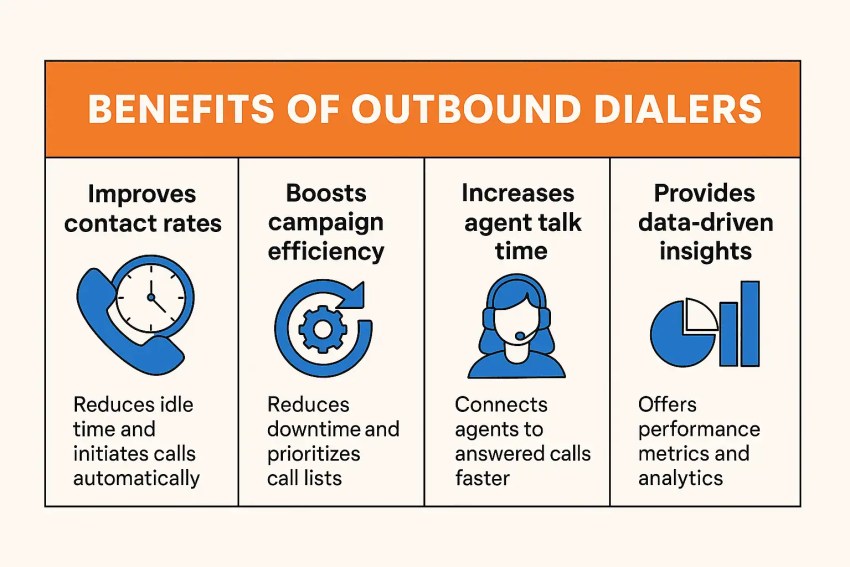
Most dialers also support scheduled callbacks and screen pops so agents have context before the conversation starts. It’s a win-win for operational efficiency and customer trust.
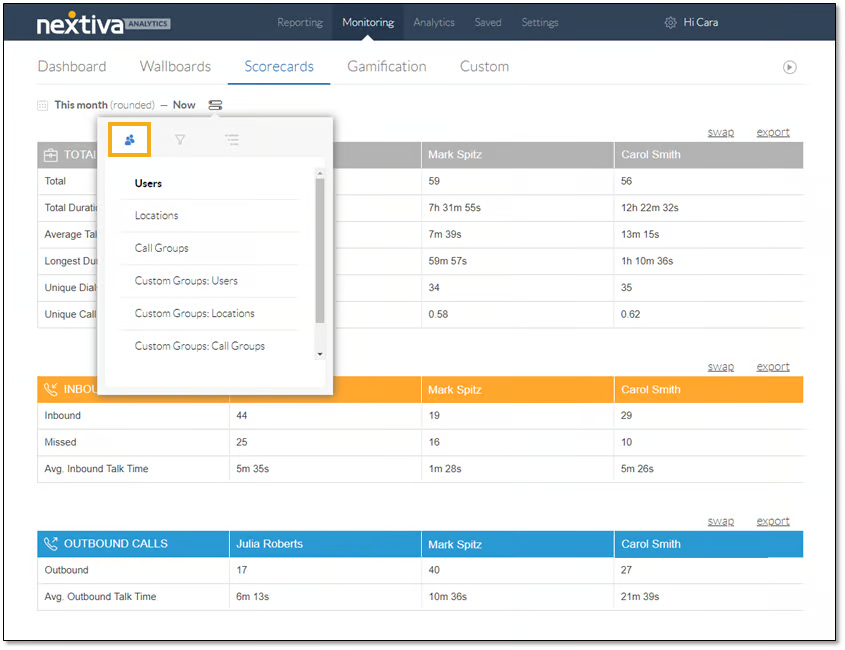
8. Data analytics and reporting
Call analytics turn daily activity into measurable trends, helping teams spot issues and improve performance faster. For example, you can identify long hold times or high abandon rates, then coach agents or adjust staffing and routing to reduce delays.
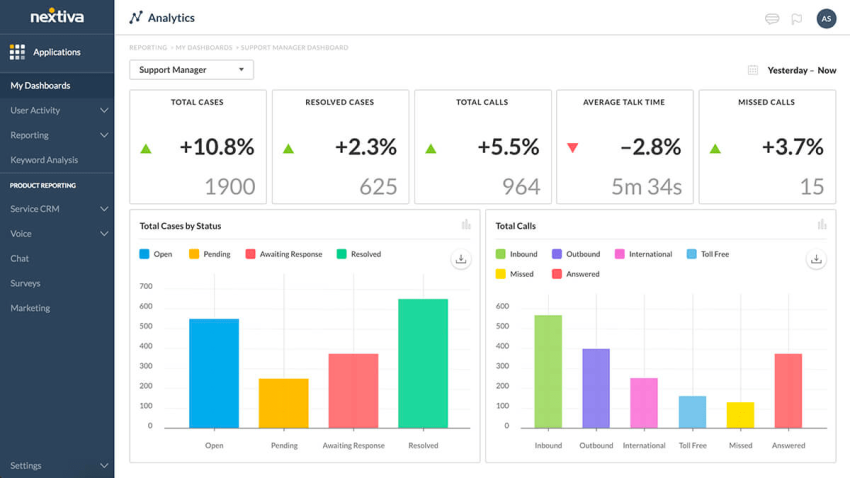
Most platforms offer real-time dashboards (queue health, wait times, agent status) and historical reports (volume trends, AHT, service level, CSAT) so managers can forecast demand and compare performance by team, queue, or channel. The best tools include ready-made reports plus the option to customize views around the metrics you care about most.
9. Call recording and QA/coaching
Contact center technologies turn raw call center data into clear actions for your team to improve customer service quality and team performance. Call recording and quality assurance (QA) tools help supervisors improve consistency, compliance, and agent performance. Recordings create a reliable record of customer conversations for training, dispute review, and coaching.
Most platforms pair recording with QA workflows such as scorecards, call tagging, and coaching notes, plus live monitoring features like listen-in and call whisper. For deeper insight, custom reporting and coaching tools can break results down by team, agent, or call type to surface patterns, like where first-call resolution is slipping or which conversations drive escalations, so coaching is targeted and based on real interactions.

10. Conversational AI (chatbots/virtual agents)
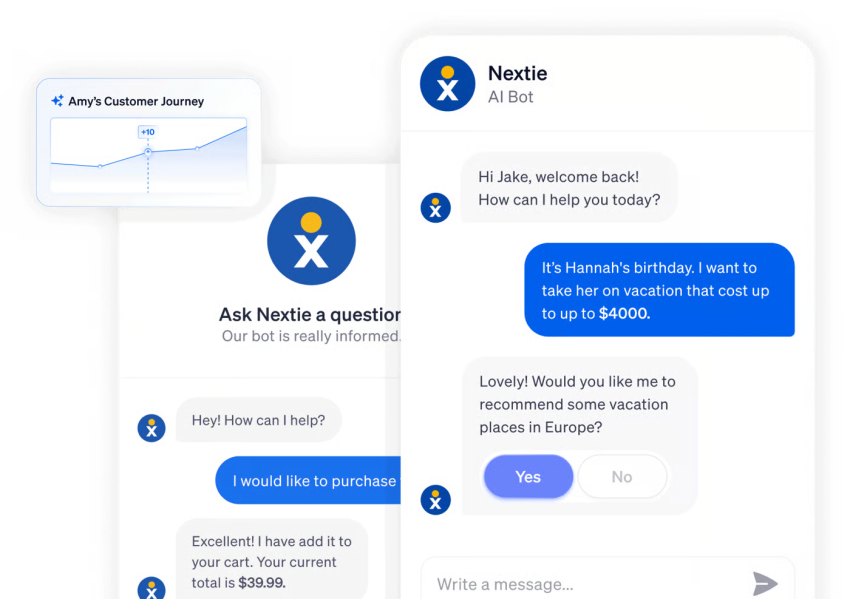
Conversational AI uses chatbots and virtual agents to handle customer requests through natural language (on chat or voice) without requiring a live agent for every interaction. It’s commonly used for 24/7 self-service, lead capture, appointment scheduling, and answering routine questions (like hours, order status, or account basics), which helps reduce call volume and free agents for complex issues.
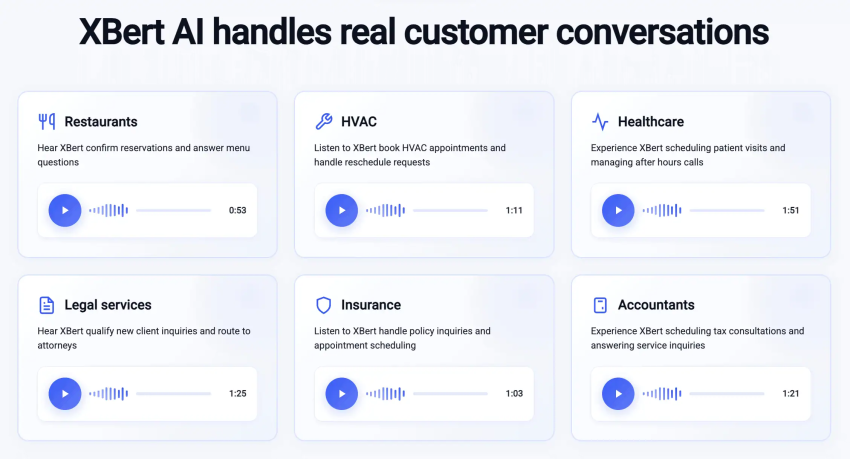
In contact centers, conversational AI can also support smarter routing by asking a few questions up front, capturing intent, and sending the customer to the right queue or agent. This includes artificial intelligence receptionists/voice agents—for example, tools like Nextiva’s XBert AI—that can answer calls, handle routine requests (hours, FAQs, scheduling), and transfer callers with context when a human is needed.

These intelligent self-service tools increase customer satisfaction by 10 points or more while cutting inquiry times by over 90%, providing convenient automated assistance across languages and channels.
11. Omnichannel integration
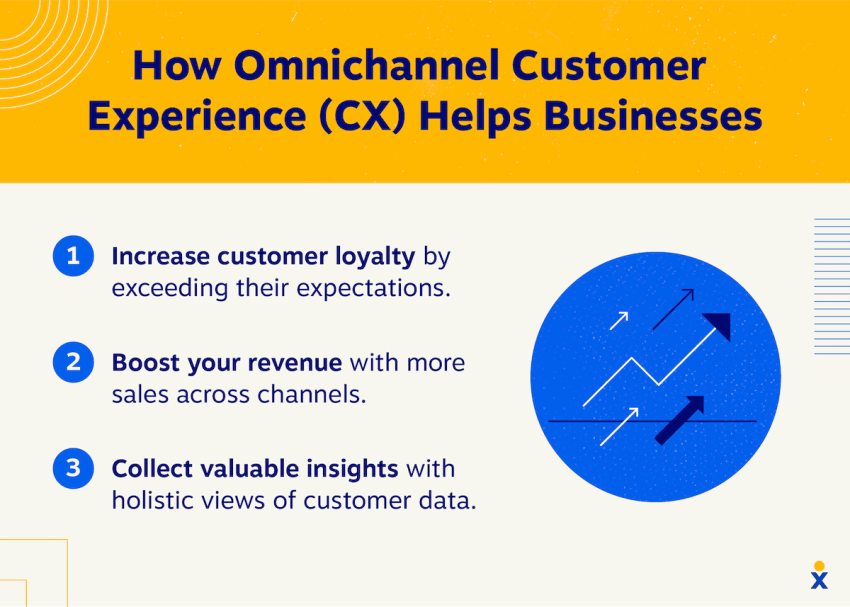
Omnichannel integration brings multiple support channels—voice, chat, SMS, and email—into one system so customer conversations stay connected. Instead of treating each channel like a separate inbox, agents can see interaction history in one place and continue the conversation without asking customers to repeat themselves.
A strong omnichannel setup also supports:
- Unified routing and queues across channels based on availability and skills
- Channel switching with context (for example, chat escalating to a call with notes attached)
- Consistent reporting on response times, resolution rates, and customer satisfaction by channel
This helps teams meet customers where they prefer to communicate while maintaining consistent service quality.

12. Unified agent workspace
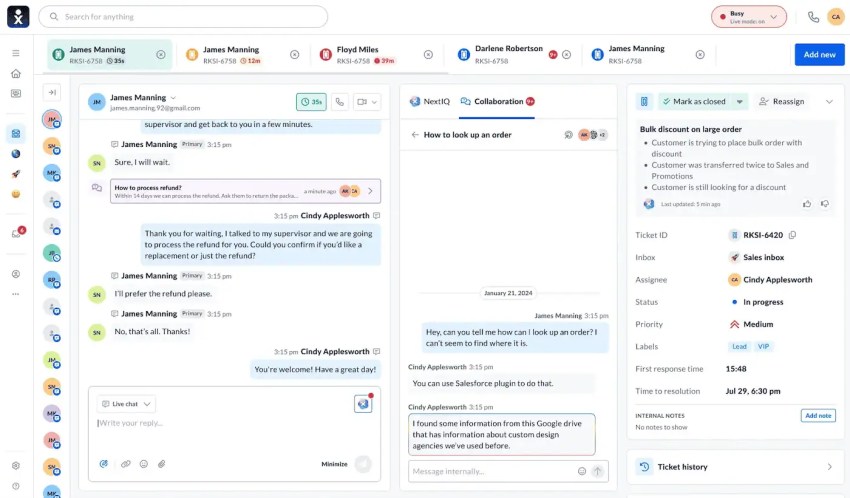
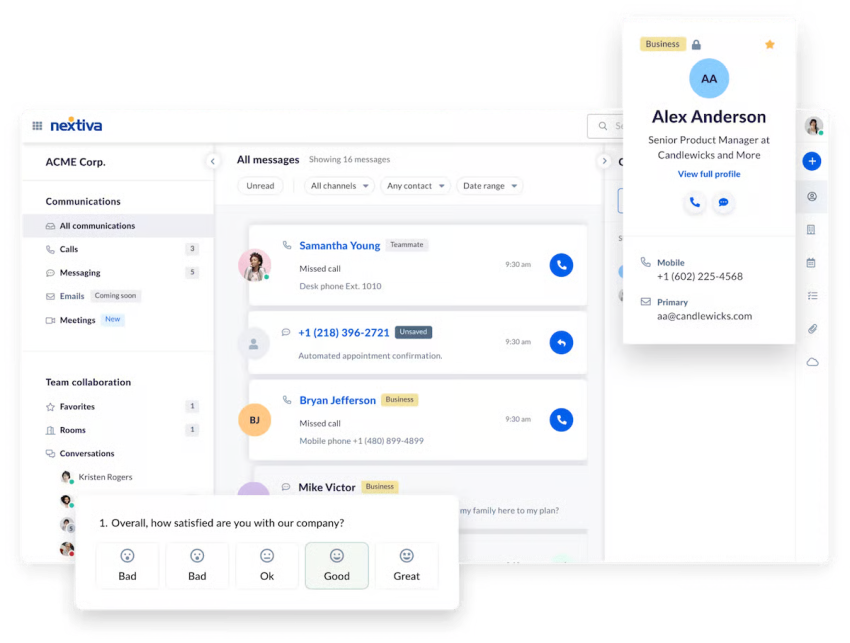
A unified agent workspace gives agents one screen to handle customer conversations across channels while keeping the right context in view. Instead of switching between a phone app, email inbox, chat tool, and CRM, agents can see the conversation history, customer details, and next steps in a single interface.
The best unified workspaces typically include:
- Omnichannel inbox for voice, SMS, chat, and email
- Customer context (contact record, recent interactions, open tickets, notes)
- One-click actions like transfers, callbacks, dispositions, and follow-ups
- Knowledge access and guided workflows so agents can respond consistently
This reduces time lost to tab-hopping, lowers errors, and helps agents resolve issues faster, especially when conversations move between channels. Keep in mind that, unlike omnichannel, which is about the channels and routing a contact center supports, a unified agent workspace is about the single interface where agents handle those channels.

Top Benefits of Contact Center Technology
Modern contact centers are no longer just cost centers; they drive immense business value. Call center technologies offer many benefits, encouraging businesses to invest in them and enrich their customer service.
1. Increase customer satisfaction
Intelligent call routing technologies analyze customer requests in real time and route them to the most qualified agents based on expertise, language skills, and past performance. This precision ensures that customers receive the most appropriate help quickly, reducing wait times and increasing satisfaction.
Modern contact center platforms offer intuitive self-service portals and AI chatbots for customers to find solutions independently. These tools handle simple requests, process transactions, and provide instant information, reducing the burden on human agents while meeting customers’ expectations for instant service.

2. Improve agent productivity
Sophisticated automation tools eliminate repetitive and time-consuming manual processes. Contact center technology, such as intelligent callback systems, automated data entry, and intelligent scheduling free up agent time for more complex customer interactions and high-value conversations that require human empathy and problem-solving.
3. Reduce operational costs
Cloud-based contact center technologies don’t need upfront hardware investments. Businesses can easily scale their capabilities, adding or reducing features without complex infrastructure upgrades. This flexibility adapts organizations to changing customer demands and market conditions.

4. Make data-driven and informed decisions
Call center analytics tools provide deep insights into customer interactions, agent performance, and operational efficiency. Contact center managers can use real-time data to identify trends, recognize top performers, address training needs, and make informed strategic decisions that enhance customer service.
5. Scale without friction
Traditional call centers scale slowly: New agents mean new hardware, new licenses, and often new physical space. Modern contact center technology removes those constraints entirely, letting you add agents, open new locations, or launch additional communication channels in a matter of hours rather than weeks. For growing businesses, that agility isn’t just convenient, it’s a competitive advantage.
7 Call Center Technology Trends to Follow in 2026
There’s no doubt we’re experiencing a shift in call center technology. Features get rolled out regularly, and the pace of change has accelerated significantly in recent years.
Here are the trends shaping the industry right now and where it’s heading next.
1. Agentic AI is replacing rule-based automation
The chatbot era is giving way to something more capable. Agentic AI systems can now handle complex, multi-step interactions autonomously, resolving billing disputes, processing returns, updating account information, and escalating intelligently when human judgment is needed.
For contact centers, this means meaningful deflection of high-volume requests without sacrificing customer experience, and human agents freed up for conversations that actually require empathy and expertise.

2. Voice AI is becoming indistinguishable from human agents
Modern voice AI handles natural, unscripted conversations, managing interruptions, detecting sentiment, and resolving common requests end-to-end without transferring to a human. For high-volume, repetitive call types like appointment scheduling, order tracking, and account verification, voice AI is increasingly the first line of response. The technology isn’t replacing agents, it’s just handling the calls agents shouldn’t have to take.

3. Omnichannel is now the baseline, not the differentiator
Customers expect their experience to be continuous regardless of where the conversation happens. Cloud-based omnichannel platforms unify every interaction (voice, email, SMS, chat, social) into a single agent view with full customer context. The businesses falling behind aren’t those without omnichannel, they’re those still treating each channel as a separate operation.
4. Real-time and predictive analytics are replacing hindsight reporting
Traditional reporting told you what happened last week. Modern platforms surface insights during live interactions by flagging sentiment shifts, identifying escalation risk, and prompting agents with next-best-action suggestions in real time. Predictive analytics goes further, forecasting call volumes and anticipating customer needs before they pick up the phone.

5. Hyper-personalization at scale is now an agent-level expectation
Deep CRM integration now gives agents instant access to a customer’s full interaction history, preferences, and predicted needs the moment a conversation begins. The result is faster resolutions, fewer repeated explanations, and an experience that feels personal rather than transactional. At scale, personalization is a great a retention strategy.
6. Social listening is shifting from reactive to proactive CX
The best contact centers aren’t waiting for customers to call with a problem, they’re identifying issues before the customer picks up the phone. Social listening tools monitor mentions, reviews, and sentiment signals across platforms in real time, giving teams the ability to intervene proactively. For brands where public perception moves fast, this shift from reactive to proactive CX is becoming a competitive necessity.
7. Security, ethics, and AI transparency are non-negotiable
As AI takes on a larger role in customer interactions, the stakes around data security and ethical use have risen with it. Leading contact centers are treating transparency as an operational priority, such as:
- Data security: Strong encryption, access controls, and regular audits ensure compliance with GDPR, CCPA, and HIPAA.
- Ethical AI: Fair, transparent systems with human oversight prevent discrimination.
- Building trust: Clear communication about data practices and AI usage, as well as customer controls, strengthens brand trust and reputation.
Studies show that customers are more influenced by a brand’s perceived ethics than its competence, making trust not just a moral obligation but a business one.
How to Choose the Right Call Center Technology
To stay ahead, businesses must carefully choose technologies that enhance both efficiency and the customer experience. Cloud-based contact center platforms are essential for the seamless integration of phone systems, CRM, and other critical software. AI-powered chatbots can handle routine inquiries, freeing up contact center agents for complex issues.
Start by mapping your current customer journey and identifying where conversations break down: long waits, too many transfers, limited agent context, or inconsistent support across channels. Then prioritize tools that solve those specific problems instead of buying features you won’t use.
Focus on a few core decisions:
- Channels you need to support: Voice-only call centers can stay simpler; contact centers that support chat, SMS, and email benefit from omnichannel routing and a unified agent workspace.
- Automation vs. human coverage: Use automation for high-volume, repeatable requests (routing, FAQs, scheduling), but make sure escalation to a live agent is clear and fast when the issue is complex.
- Integrations and data flow: Choose technology that connects cleanly to your CRM/help desk so customer context and call outcomes are captured automatically.
- Reporting and quality controls: Look for real-time dashboards plus historical analytics, call recording, and QA tools so supervisors can coach and improve performance.
- Scalability and admin overhead: As you grow, you’ll want systems that add users, queues, and locations without heavy IT effort, plus those that provide strong permissions and reliability.
Stay agile and responsive to both technological advancements and customer expectations, and ensure your call center remains efficient, effective, and customer-focused with advanced call center technology. The best stack is the one that matches how your customers reach you today, supports your team’s workflow, and leaves room to expand as your channels and volume change.

Nextiva’s Call Center Solution
Call center technology works best when it reduces friction for customers and removes manual work for agents. If you’re ready to modernize your stack, consider platforms that combine routing, analytics, integrations, and customer engagement tools in one place, so your team can deliver consistent service as you scale.
Nextiva is one option to compare if you want a unified system designed for growing support teams.
Your AI-Powered Contact Center
Create amazing customer experiences with AI-powered contact center software. Scalable contact center platform built for omnichannel customer conversations.
Call Center Technology FAQs
The main function of contact center technology is to manage and optimize customer interactions across various channels, ensuring efficient communication and resolution of inquiries.
While often used interchangeably, a call center primarily handles phone calls, while a contact center manages customer interactions across communication channels, including phone, email, chat, and social media.
Call centers can be categorized as inbound (handling incoming calls), outbound (making outbound calls), or blended (handling both inbound and outbound calls). They can also be specialized in specific industries or functions, such as sales, customer support, or technical support.
Most call centers rely on a cloud-based contact center software platform — such as Nextiva, RingCentral, or Genesys — that handles routing, omnichannel messaging, IVR, and reporting in a single interface, integrated with a CRM for full customer context.
Call center automation is increasingly standard, handling routine tasks like call logging, follow-up emails, and callback scheduling without agent involvement. Many operations also run as a blended call center, where agents handle both inbound and outbound interactions depending on demand — a model now built into most modern call center software platforms by default.
Call centers use various systems, including:
– ACD (Automatic Call Distributor): Routes calls to the appropriate contact center agents.
– IVR (Interactive Voice Response): Automates call handling with pre-recorded messages and menu options.
– CRM (Customer Relationship Management): Stores customer data and interaction history.
– Telephony systems: Facilitate phone calls and related functionalities.
– Workforce management systems: Help manage agent schedules and performance.
To run a cloud call center, you need:
– A good internet connection with enough bandwidth to support VoIP calls
– A computer or laptop for each agent
– Headsets with noise cancellation for clear communication
– VoIP-enabled phones , if not using softphones
– Call center software or contact center software
– A power backup system , such as a UPS or generator, to prevent downtime
– Network equipment , like routers, switches, and firewalls, to maintain stable and secure connectivity
Cloud contact center technology reduces the need for on-premises equipment and simplifies scalability as your team grows.