

Business communication needs have shifted, and the demand for a unified communications platform is at an all-time high. While platforms like eVoice work great for solopreneurs looking for a basic digital footprint, their architecture can quickly become a bottleneck as you scale.
If you’re outgrowing simple call forwarding, you need a solution that balances cost with advanced AI, omnichannel support, and CRM integrations.
The eVoice alternatives in this article offer these capabilities within a scalable communication platform for SMBs and enterprises.
eVoice vs. Top 3 Alternatives
| Feature | eVoice | Nextiva | Dialpad | OpenPhone |
|---|---|---|---|---|
| System type | App/virtual Forwarding | Unified communications & customer experience | AI-powered VoIP | Hybrid (analog/cloud) |
| Physical desk phones | ❌ | ✅ | ✅ | ✅ |
| CRM integrations | ❌ | 20+ | 45+ | 10+ |
| AI capabilities | Voicemail-to-text | XBert AI receptionist, AI summarization and transcription | Real-time transcripts and instant call summaries | Sona AI receptionist |
| MMS (media/PDFs) | ❌ | ✅ | ✅ | ✅ |
| Reliability (uptime) | Not disclosed | 99.999% | 99.9% | 99.9% |
| 24/7 customer support (all plans) | ❌ | ✅ | ❌ | ❌ |
| Starting price | $14/month | $15/user/month | $15/user/month | $15/user/month |
| Best for | Small teams | Growing businesses | AI-focused businesses | Small business owners |
Why Businesses Are Leaving eVoice
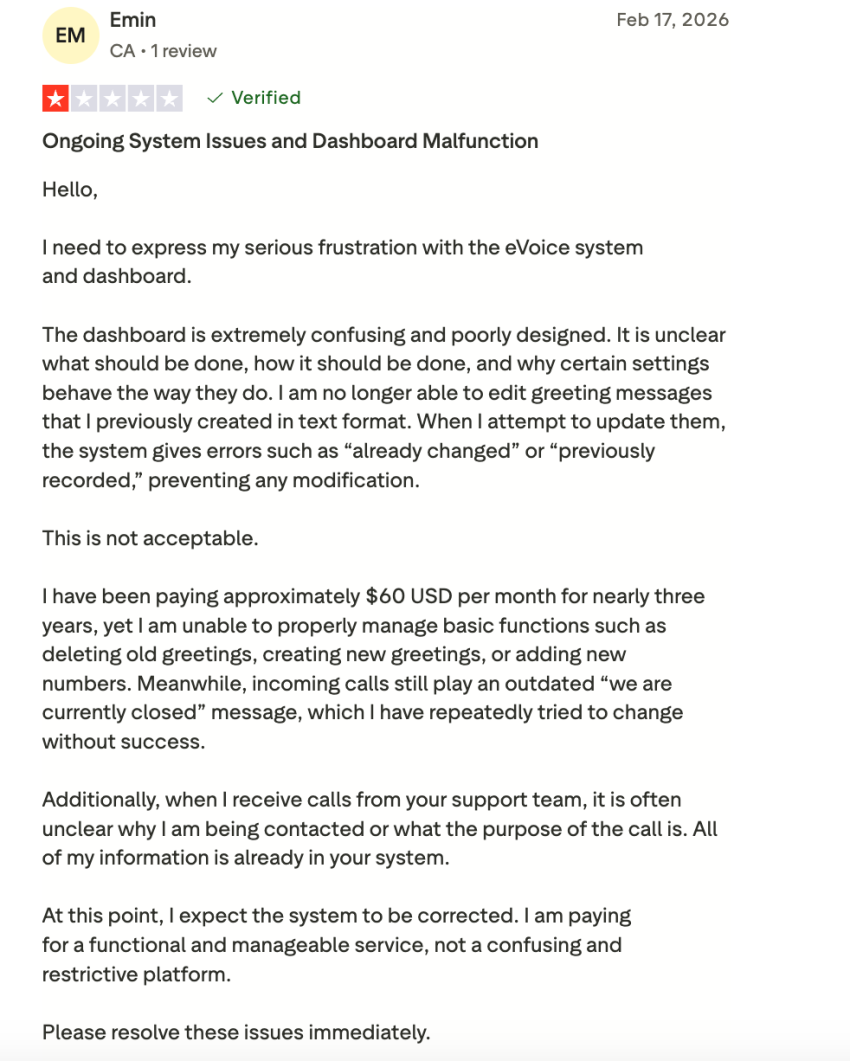
Despite its long history, eVoice is struggling to keep pace with advanced technological demands. Key reasons businesses switch include:
- Purely virtual architecture (no support for desk phones): eVoice is a virtual phone system that builds upon your existing mobile or landline connection. SIP-enabled desk phones are not supported. For growing businesses moving to professional office space, the lack of an option to connect a high-quality IP phone or use a dedicated VoIP phone is a significant drawback.
- Double phone costs: Because eVoice is a call forwarding service, it doesn’t replace your phone bill; instead, it increases it. You need a separate mobile or landline connection to receive calls. Complete VoIP providers like Nextiva, on the other hand, offer a complete phone service, reducing your overall costs.
- SMS features (no MMS or group chats): While eVoice offers unlimited SMS in some plans, it remains a basic SMS tool. Modern teams need MMS (Multimedia Messaging Service) to send PDFs, images, and videos to customers and manage group chats — features that eVoice doesn’t yet offer in its core offering.
- No CRM integrations: eVoice offers virtually no native integrations with CRMs like Salesforce or HubSpot. Your team members must manually log every call and contact, creating data silos and reducing productivity.
- Lack of AI-powered insights: Advanced eVoice competitors offer real-time transcription, automatic summaries, and sentiment analysis (for example, detecting if a caller is frustrated before you answer). eVoice’s feature set is stuck in the pre-AI era, offering only a basic voicemail-to-text function and no automations.
The 8 Best eVoice Alternatives for 2026
Each alternative below is a proven cloud communications platform that offers far more than eVoice in terms of VoIP functionality, features, and scalability.
1. Nextiva (Best overall for growing businesses)
Nextiva is a complete business communications platform for inbound and outbound teams. It delivers a comprehensive unified communications solution, blending voice, video conferencing, team messaging, and customer management tools into one system. The platform is popular among businesses that want to consolidate their disparate communication channels, such as phone, SMS, video, and email, into a unified inbox.
This enables professionals to deliver a better customer experience (CX). According to a survey, 81% of CX professionals agree that having customer data in a single system improves CX.
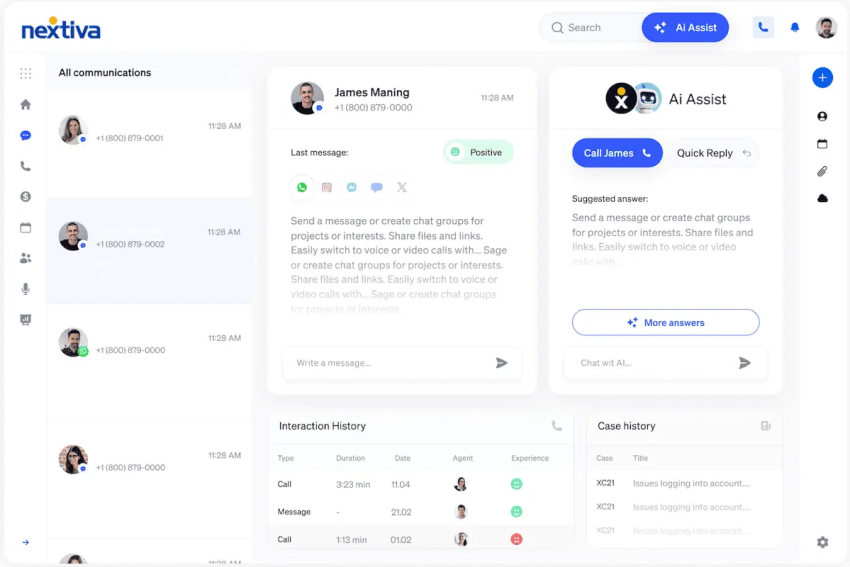
Your team becomes better equipped to deliver a professional service when they don’t have to constantly change apps. They’re also well supported with features like voicemail-to-email transcription, call queuing, auto-attendant phone menus, and other modern functionality.
Most importantly, when dealing with business communication, you need reliable platforms that are readily available and effectively protect business data. Nextiva promises 99.999% uptime and prioritizes security. It lets you subscribe to platform status updates, keeping you informed about the communication system at all times.
Why choose Nextiva?
Nextiva is known for its outstanding customer service, and users highly appreciate Nextiva for its focus on providing prompt and efficient support.
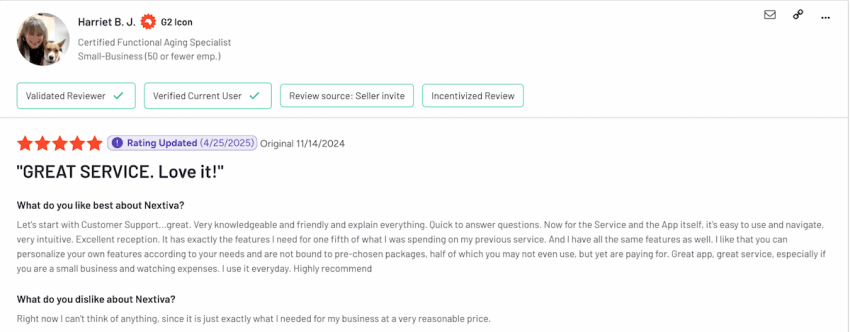
Below are some other reasons that Nextiva is a preferred choice over alternatives:
- Truly unified communications: Nextiva delivers voice, video, SMS, fax, and team chat in one platform, without needing separate tools for each channel. These unified conversation threads reduce complexity and improve responsiveness.
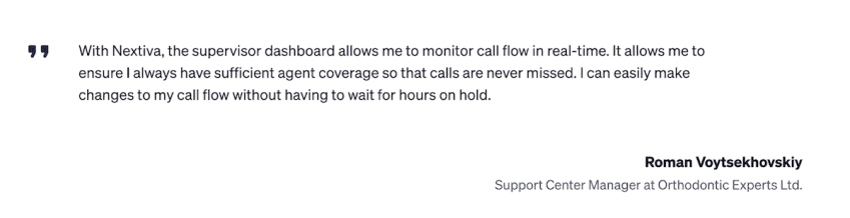
- Real-time analytics and performance dashboards: Nextiva provides live dashboards and detailed reports to track call volumes, hold times, agent availability, and more in real time. Managers monitor calls as they occur and adjust staffing or call routing on the fly. These insights help optimize contact center workflows and reduce missed calls or long wait times.
- Useful integrations: Nextiva has native integrations with major CRMs and productivity apps, including Salesforce, HubSpot, Zendesk, Microsoft Teams, and more. When a call comes in, agents can view CRM data screen pops. When the call completes, call notes and recordings are automatically synced back to the customer records.
- Scalability for growing teams: Nextiva is trusted by over 1 million users and 100,000+ businesses. Its platform is built to scale seamlessly, allowing you to start with a few users on a basic plan and then graduate to full contact-center capabilities on the same system. As your company grows, Nextiva becomes a long-term choice.
Best for: Scaling SMBs and teams that need high-touch customer support.
Pricing:
- Core: $15/user/mo (Inbound/outbound calling, SMS, and video).
- Engage: $25/user/mo (Adds advanced reporting, toll-free numbers, and web chat).
- Power Suite CX: $75/user/mo (Omnichannel AI, transcription, and real-time dashboards).
2. Quo (Formerly OpenPhone)
Quo provides a shared inbox experience that enables teams to use one or more numbers while collaborating on their management.
This allows multiple people to handle incoming inquiries without stepping on each other’s toes. You get features like unlimited calling and texting in the U.S. and Canada. The system generates call summaries and uses AI to suggest three possible reply drafts to inbound texts, which an agent can send with one click. This empowers the team to show that it’s responsive and professional while being lean and efficient.
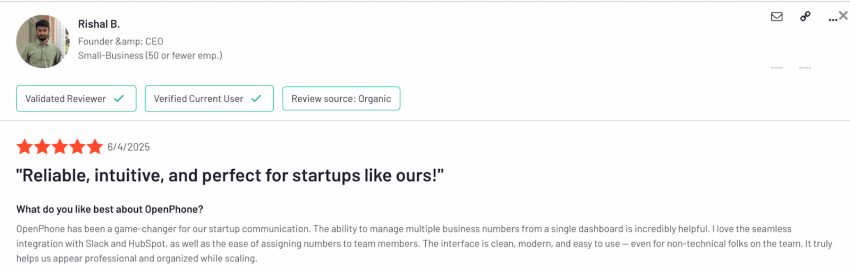
A G2 reviewer praises the software’s shared inbox and calls it “reliable, intuitive, and perfect for startups like ours!” Here’s their detailed review:
Why choose OpenPhone?
Here’s an overview of why people choose OpenPhone:
- Unlimited texting: OpenPhone includes unlimited SMS and MMS on all plans, with no per-message fees or monthly caps. You can confidently send customers photos, PDFs, or other media as needed. It also supports group messaging. All of this is provided without surprise charges, which users appreciate.
- Productivity boosters: The software enables you to communicate more efficiently using snippets, thereby expediting the workflow for repetitive tasks. Call summaries and automated logging of action items with AI saves you from manual note-taking.
- Integrations: OpenPhone fits nicely into a modern SaaS stack. It offers integrations to push notifications to Slack (e.g., when a call is missed or a voicemail arrives), sync contacts and activities with CRM systems like HubSpot or Salesforce, and connect with countless other apps via Zapier.
Best for: Small, tech-savvy teams that prioritize shared SMS/MMS inboxes.
Pricing:
- Starter: $15/user/mo (Calling and messaging to US and Canadian numbers).
- Business: $23/user/mo (Adds AI summaries and CRM integrations).
- Scale: $35user/mo (Adds advanced automations and AI support).
3. RingCentral (RingEx)
RingCentral caters to unified communication as a service needs for the enterprise market. It’s a choice for businesses using productivity suites like Microsoft 365 or Google Workspace while integrating the business phone system into the workflow.
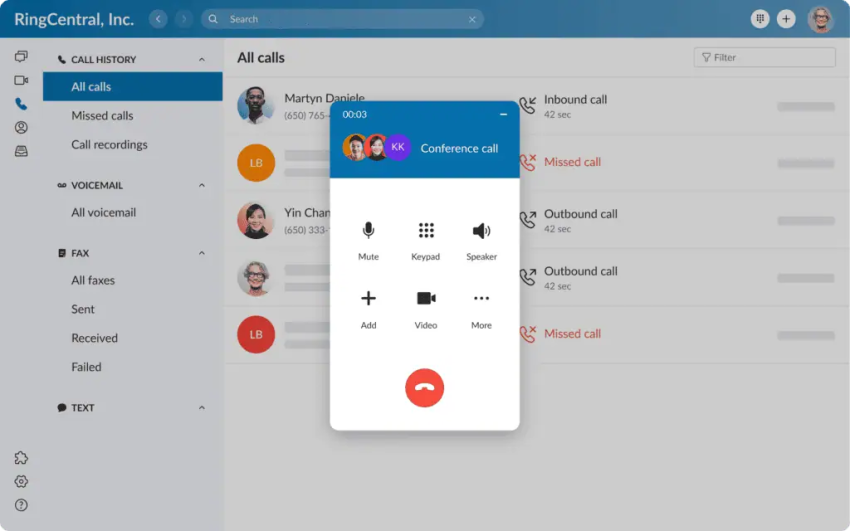
The platform offers decent pre-built integrations that extend across CRMs, service desks, scheduling tools, and HR apps. Teams with complex feature needs might consider the RingCentral platform.
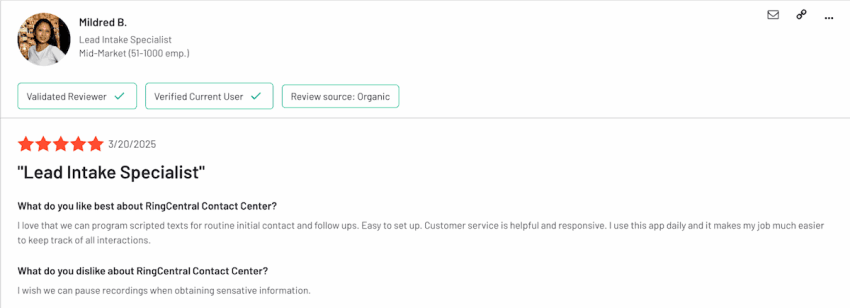
Some users feel that the platform makes their job easier by tracking all communication, but there are unique cases where individuals require more customization and flexibility in software features.
Why choose RingCentral?
Below are a few reasons why organizations choose RingCentral for their communication system:
- Supports remote, hybrid, and in-office setups with ease: RingCentral’s cloud platform was built to be location agnostic. Employees use the service whether they’re in a traditional office with IP desk phones, working from home with just a laptop, or on the go with a mobile app.
- Omnichannel communications in one platform: Beyond voice, RingCentral offers video meetings, SMS messaging, internet fax, and team chat, all unified. With the higher-end RingCentral Call Center (or their newer RingCX), you also get channels like web chat, Facebook Messenger, and more.
- Scalability: Large enterprises choose RingCentral for its security certifications and its ability to serve thousands of users across multiple countries. Local numbers are available in over 100 countries, and it offers GDPR-compliant data routing for European operations.
Best for: Large organizations and Microsoft 365/Google Workspace-heavy environments.
Pricing:
- Core: $20/user/mo (Unlimited domestic calling).
- Advanced: $25/user/mo (Adds multi-site management).
- Ultra: $35/user/mo (Adds unlimited storage and analytics).
4. Grasshopper
Grasshopper offers a simple, affordable second phone line without any hassle. It’s a virtual phone system that keeps your personal and business calls separate while still using your existing phone.
Grasshopper gives you a business phone service (toll-free or local) and forwards calls to your cell or any phone you choose, much like eVoice, but with more polish and a few extra features tailored for small business needs. It’s easy to get started as there are no hardware requirements. It enables freelancers or solopreneurs to establish a professional image by presenting a proper business voicemail greeting and extension menu, all while on their device.

If you’re considering it, look out for a few things like video conferencing capabilities or AI features before making a decision.
Why choose Grasshopper?
Below are some reasons why people choose Grasshopper as their phone system:
- Instant professional setup: You can sign up and get a working business number in minutes, with no technical installation. Grasshopper lets you choose a local or toll-free number, or port one in, and record a custom main greeting easily.
- Multiple extensions on one number: Even if you’re a company of one or two people, Grasshopper’s extension system can make you sound bigger. You can set up an extension for each department or person — “Press 2 for Sales, 3 for Support,” — all under the same main number.
- Custom greetings and personalized routing: Grasshopper offers custom recorded greetings, on-hold music, and voicemail messages that add a personal touch. It’s easy to configure call forwarding rules, such as ringing multiple numbers simultaneously or in sequence, to ensure someone answers.
Best for: Freelancers and very small teams (1-3 people) who want a separate business line.
Pricing:
- True Solo: $14/mo (1 number, 1 extension).
- Partner: $28/mo (3 numbers, unlimited extensions).
- Small Business: $55/mo (5 numbers, unlimited extensions).
5. Vonage
Vonage offers a versatile business communication platform with highly customizable integrations. You can use the service for your standard calling and conferencing needs, but it also provides custom APIs to integrate individualized voice, SMS, and video features into your own applications or workflows.

The platform features a comprehensive suite of VoIP capabilities, including an auto attendant, routing, recording, messaging, and video conferencing, making it a reliable cloud-based PBX for everyday communication. Companies that send a high volume of outbound texts, such as marketing blasts or appointment reminders, would benefit from Vonage’s offering.
Why choose Vonage?
Below are some reasons why people choose Vonage’s phone system:
- Global coverage and local presence dialing: Vonage supports localized caller ID, so your outbound calls can display a local number to recipients in different countries. Additionally, it offers multilingual voicemail transcription and IVR options. This way, international teams are well equipped to serve customers in multiple languages.
- Highly customizable call flows: With Vonage, you can design tailored call routing strategies and text messaging workflows — for example, creating an IVR that interacts with your database. It allows users to set custom SMS workflows where different customer texts trigger different responses.
- Integration with business applications: Beyond the DIY API route, Vonage Business Cloud offers many plug-and-play integrations. For example, Vonage integrates with Zoho CRM, Microsoft Dynamics 365, Slack, and others.
Best for: Businesses needing customized outbound SMS workflows or multilingual IVR.
Pricing:
- Mobile: $13.99/line/mo (Unlimited domestic calling, mobile app, voicemail, and SMS and MMS)
- Premium: $20.99/line/mo (Adds CRM integrations and desk phone support).
- Advanced: $27.99/line/mo (Adds call recording and visual voicemail).
6. Ooma Office
Ooma Office supports both modern VoIP and traditional analog devices. It’s ideal for businesses that want to transition to VoIP but still rely on some old-school equipment. It serves the needs of local service businesses that have existing cordless phones, cell phones, or fax machines they’re comfortable with. Ooma Office lets them keep those while still gaining VoIP features.

Brick-and-mortar small businesses without an IT staff are the ones that generally opt for Ooma’s cloud service. Its installation is quite simple, just plug in a router-like device and some phone cables.
Although it is flexible enough to accommodate analog gear, Ooma Office doesn’t lack modern features. It offers an auto attendant, ring groups, extension dialing, voicemail, and other advanced features that business teams seek. The platform provides a cost-effective solution for unlimited calling in the U.S., Canada, and Mexico. Some Ooma users have explicitly mentioned the platform’s cost-effectiveness and reliability in their reviews.

Why choose Ooma Office?
Below are some reasons why Ooma Office has become a preferred choice for businesses:
- Hybrid setup: Ooma Office allows you to keep your existing analog phones or fax machines and seamlessly integrate them into the cloud system with minimal effort. Through devices like the Ooma Analog Telephone Adapter and base station, you can connect to the internet but still use standard phone jacks for your existing equipment.
- Advanced features: Ooma Office includes essential call management features without overcomplicating them. It allows you to easily set up a virtual receptionist that greets callers and directs them to the appropriate agent.
- Reliable service: Ooma’s PCMag Business Choice Awards for 12 years straight are evidence of its reliability and customer satisfaction.
- Mobile app with full functionality: Although Ooma supports analog phones, it also features a mobile and desktop app. The application turns your smartphone or computer into an Ooma Office extension, where you can make or receive calls through the business phone number.
Best for: Brick-and-mortar shops (clinics, retail) that want to keep their existing desk phones.
Pricing:
- Essentials: $19.95/user/mo (Unlimited Calling in the US, Canada, Mexico, and Puerto Rico)
- Pro: $24.95/user/mo (Adds call recording and a desktop app).
- Pro Plus: $29.95/user/mo (Adds CRM integration and hot-desking).
7. Dialpad Connect
Dialpad offers several AI-powered features with a sleek, modern user experience. It doesn’t just connect calls — it transcribes them in real time, analyzes sentiment, and delivers live coaching for agents or sales representatives as the conversation unfolds.
As you talk, Dialpad creates an accurate live transcript on the screen. This real-time transcription enables agents to identify errors and re-collect pointers they may have missed in their scripts. The live coaching prompts enable sales professionals to address various objections intelligently, making it easier to scale what works for others on the team.
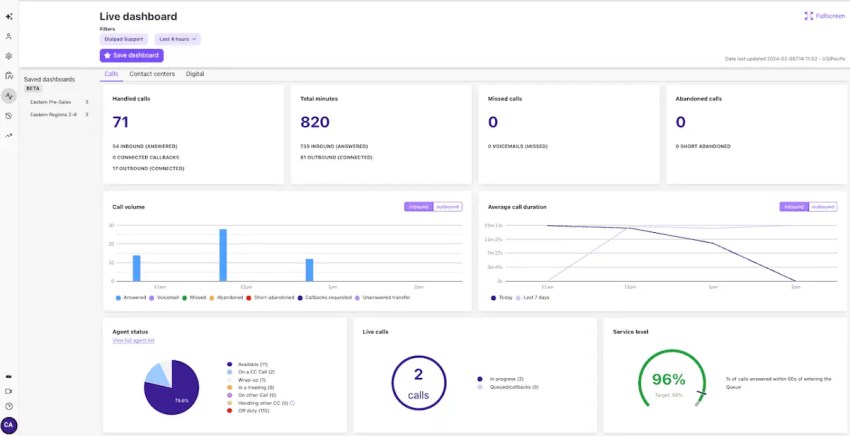
Dialpad’s AI generates post-call summaries to highlight key action items and follow-up tasks, which get automatically documented on the CRM.
Why choose Dialpad?
Below are some reasons why people prefer Dialpad:
- Voice and video in one browser-friendly app: There is no requirement to install a desktop client, though one is available, to join video conferencing meetings. You can participate via browser with a click. This lightweight approach expedites workflow for bringing new people in.
- AI sentiment analysis and call summaries for training: The software analyzes customer sentiments in real time and logs them. Supervisors may choose to be alerted if any call’s sentiment turns negative, which can help prevent a conversation from getting sour.
- Integrations with CRM and other business applications: Dialpad offers native integrations with Salesforce and Zendesk, allowing agents to view caller information, receive CRM screen pops, and automatically log calls with recordings and transcripts.
Best for: Sales-driven teams and businesses prioritizing AI coaching and transcription.
Pricing:
- Standard: $15/user/mo (HD calls and meetings, real-time transcripts, and instant call summaries)
- Pro: $25/user/mo (Adds CRM integrations and 24/7 support).
- Enterprise: Custom (100-seat minimum).
8. 8×8
8×8 is ideal for companies that want to manage all forms of communication, including voice, video, chat, email, and SMS, within a single integrated system. Often, such business units have a focus on contact centers.
With the help of a unified system, an agent can view previous conversations and interactions a customer has had with the business, making it easier to respond thoughtfully.
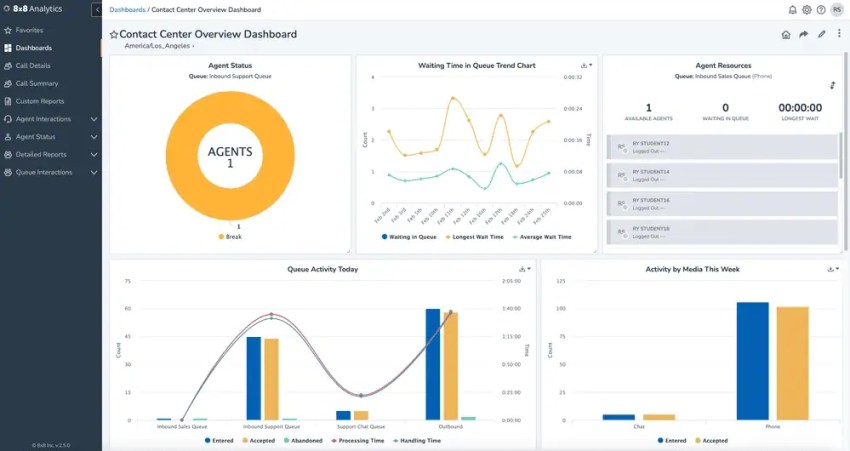
The platform allows for persistent SMS threads across agents and shifts. Many phone systems treat SMS as person-specific, meaning if Agent A texts a customer and then goes off shift, Agent B might not easily see that prior SMS thread.
8×8 treats SMS more like a shared email or case — the conversation remains open and visible to multiple agents, allowing a team to manage ongoing text conversations collectively.
Why choose 8×8?
Below are some reasons that encourage users to go for 8×8:
- Global telephony and compliance coverage: For companies with a worldwide footprint, 8×8 lets you provision local numbers in over 100 countries. It also ensures a European Union (EU) customer’s call recordings stay in EU data centers to comply with GDPR.
- Advanced IVR and AI capabilities: 8×8 provides a configurable IVR system that integrates with databases to deliver intelligent suggestions. These can be about reading back-order information or taking payments.
Best for: International companies and teams with high-volume outbound global calling.
Pricing: Requires a custom quote.
Read this: Exploring 8×8 Alternatives? Read This Before Buying
Why Nextiva Is the Best eVoice Alternative
While different eVoice competitors offer unique features, Nextiva provides an all-in-one solution for business communication. It combines the strengths of multiple platforms in one: the reliability and scalability of an enterprise phone system, the ease of use that small teams require, and a rich feature set that includes integrations and analytics.
Nextiva is a comprehensive VoIP phone system that eliminates the need for landlines. It empowers your workflows with omnichannel capabilities, making it easier to assist customers over phone, text, video, or voice, without losing context.
Overall, Nextiva enables you to create a memorable experience for customers while ensuring 99.999% uptime.
Book a Nextiva Demo, and see whether it checks the features and functionality you were looking for in eVoice.
The small business VoIP phone system for modern work.
Get business phone calls, video meetings, and secure messaging in one platform. Easy setup. Budget-friendly. Trusted by millions.